

Thermal printers typically feed labels by using a motor-driven platen roller to pull the media past a stationary thermal printhead. Guides control the path, while gap or black-mark sensors provide position references for individual labels. The controller coordinates feeding, heating and the final stopping position. For conventional adhesive labels, the label and release liner travel together until any separate peeling stage.
The important distinction is between moving the media and locating the next label. A roller can turn smoothly while the printer uses the wrong sensing reference. A sensor can detect a gap correctly while inconsistent traction affects the actual advance.
I would assess both functions before selecting a roller assembly. This article focuses on conventional liner-backed label media, with separate notes on ribbon transport, output handling and linerless systems.
What Happens During a Label Feed Cycle?
The printer coordinates media movement with a known label reference and the selected output mode.
A typical cycle involves five functions:
- Supply the media: Labels unwind from a supported roll or enter from a compatible fanfold supply.
- Guide the strip: Media guides locate the label-and-liner web across the feed path.
- Establish position: The controller uses the selected sensor reference and media settings to determine where the label lies relative to the print line.
- Advance and print: The driven platen moves the media while heating elements across the printhead form successive lines of the image.
- Present the output: The printer advances to the position required for tearing, cutting, peeling or the next print cycle.
The physical order and control sequence vary by printer. The media sensor may sit upstream of the printhead, so detection and printing do not occur at the same location. The controller must account for the distance between them.
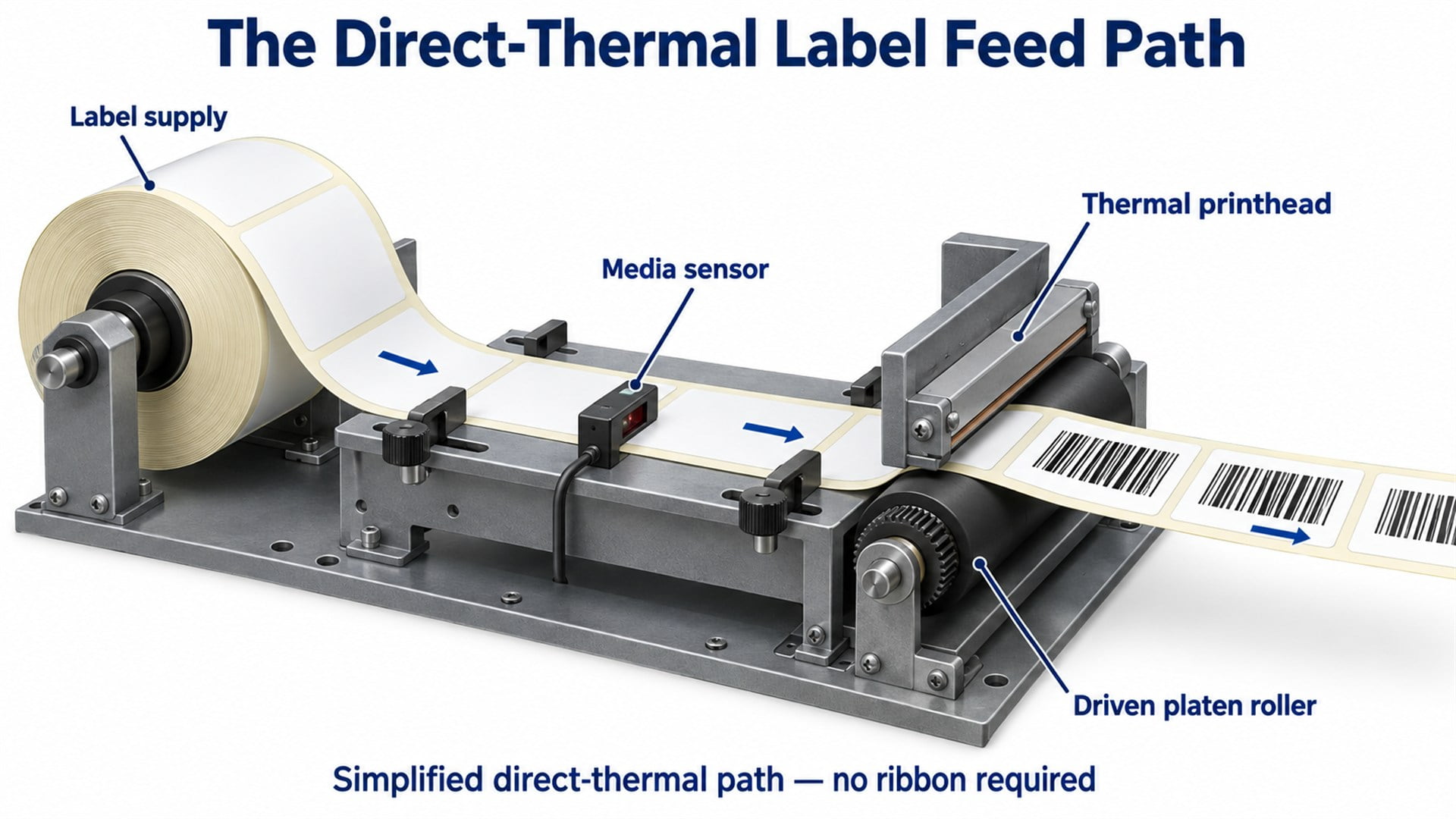
Figure 1. A simplified direct-thermal feed path. The label and liner pass together between the printhead and platen; no ribbon is used in this illustration.
This differs from feeding individual sheets, where pickup and separation are additional tasks. Our explanation of how a printer paper feed system works covers that related mechanism.
Why Is the Platen Roller Central to Label Feeding?
The platen provides both transport traction and support beneath the print line.
In a common thermal mechanism, the printhead and compliant platen press against opposite sides of the media. A motor drives the platen through the selected transmission, drawing the strip through that contact region.
The relationship is illustrated in thermal printer patent publication WO1997018087A1, which describes a driven roller opposite a thermal head pulling web material from a supply roll. Its particular spring arrangement is one design example, rather than a requirement for all printers.
The platen's surface must transmit the required force while maintaining appropriate contact with the head. More pressure is not automatically better: the surface material, deformation, drive torque and media all affect the working condition.
For engineering assessment, distinguish nominal motor movement from actual media advance. Effective roller diameter, slip and drivetrain behaviour can change the distance travelled. A roller that looks correct by outside diameter alone may still behave differently once pressed against the printhead and loaded with media.
How Does the Printer Find the Beginning of Each Label?
It uses a reference suited to the media, commonly a gap or a black mark.
Gap sensing
A transmissive sensor compares light passing through the media. On suitable die-cut stock, the label-plus-liner region and the exposed liner between labels produce different signals. The gap is an optical reference; the liner normally remains continuous.
For regularly spaced labels, the repeat pitch includes the label length in the feed direction plus the gap. It is different from the label's printable area.
Black-mark sensing
A reflective sensor detects a suitable dark registration mark against the surrounding material. The mark is commonly on the underside of the liner, at a position matched to the sensor path.
Zebra's movable-sensor documentation distinguishes transmissive and reflective sensing and explains sensor positioning for the described printers. That distinction matters when specifying both the label stock and its path.
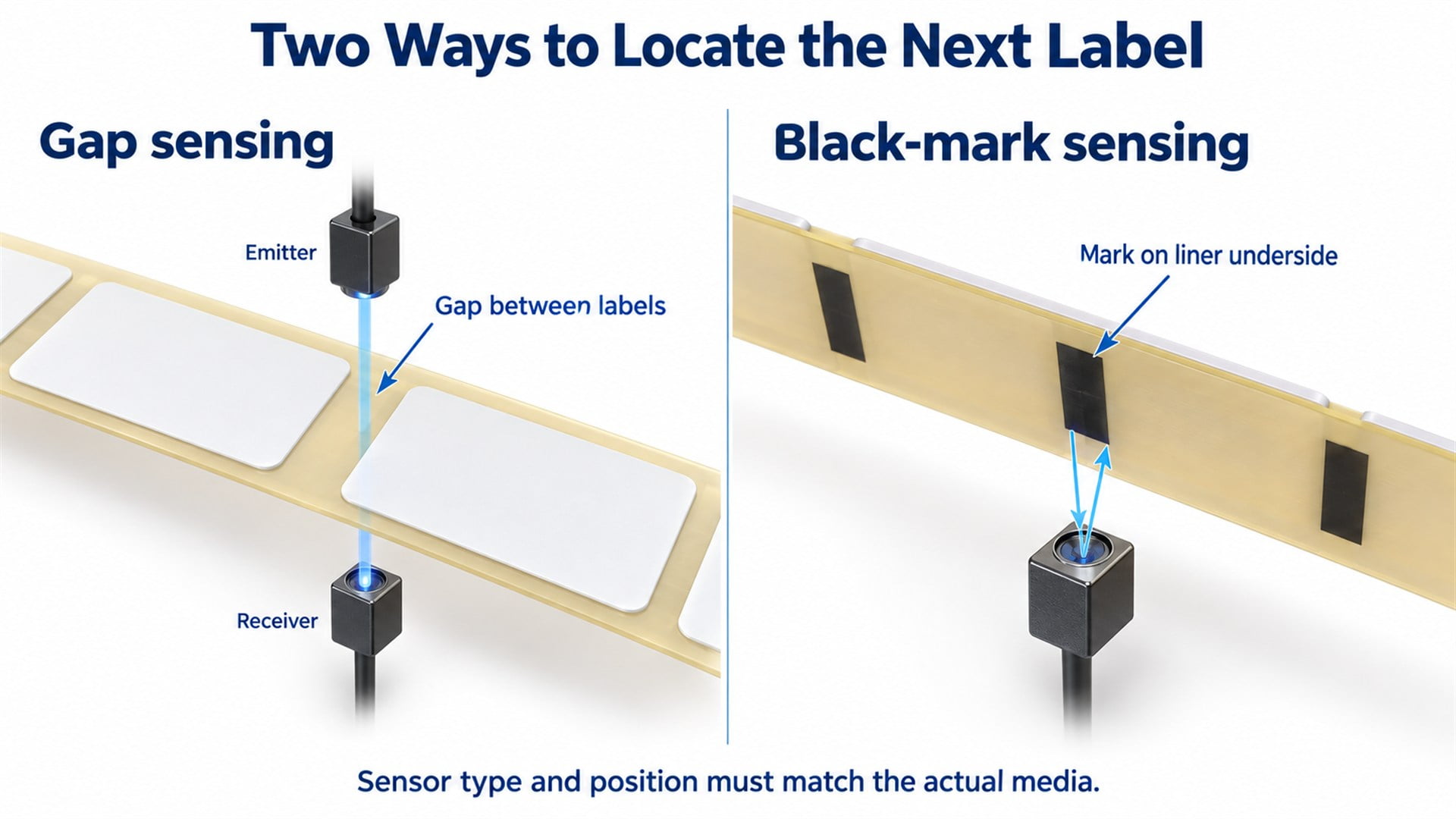
Figure 2. Two label-position references. The sensing method, optical contrast and sensor location must match the actual media construction.
Continuous media without a repeating boundary reference uses a configured print length rather than detecting a gap for each label. Media-out detection remains a separate function. A printed barcode is not automatically the registration reference used by the feed controller.
Calibration establishes suitable sensor behaviour for the installed media and may also determine its repeat length. It does not physically correct a roller fit or remove drag from the path.
Do Direct Thermal and Thermal Transfer Printers Feed Labels Differently?
Both need controlled media transport, but thermal transfer adds a separate ribbon path.
Direct thermal printing forms the image in a heat-sensitive label coating. Thermal transfer printing uses heat to transfer an image-forming coating from a ribbon onto the label. SATO's comparison of the two thermal printing methods explains this distinction.
In thermal transfer equipment, the ribbon passes between the printhead and label, then follows its own take-up path. Ribbon movement and tension must be compatible with the media passing through the print zone. The ribbon is a printing consumable, not the release liner that supports the adhesive labels.
For an OEM enquiry, specify the printing method. A drawing showing only the label path may omit ribbon guides, shafts or nearby clearances that affect the available space and operating conditions.
What Keeps the Label Strip Tracking Straight?
The supply support, guides, platen and mounting structure must maintain a consistent path without adding unnecessary resistance.
A label web can shift sideways even when its repeat pitch is detected correctly. Guide spacing, supply-roll position and platen alignment all influence where the media passes beneath the printhead and across the sensor.
Guide clearance must suit the web width. A guide should locate the media without squeezing it or rubbing excessively against its edges. The relevant width may be the liner width, not just the face label width.
The supply arrangement also matters. Roll inertia, unwinding resistance and acceleration affect the force needed during starts. A fanfold supply removes the rotating supply roll but introduces its own path and fold behaviour.
Label construction adds further variables. Liner thickness, stiffness, coatings and exposed adhesive at edges can alter contact or resistance. I would request actual media samples alongside the drawing when a proposed roller touches the label web. A generic description such as “paper labels” leaves too much undefined.
How Do Tear-Off, Cutter and Peel Modes Change Feeding?
The output mode determines where the printed label must stop and how the media is routed after printing.
In tear-off mode, labels normally remain on their liner and advance to a presentation position. A cutter adds a cutting station and its own media-compatibility requirements. Cutting location and permissible material must suit that cutter's specification.
In peel mode, the liner changes direction around a peeling feature so the label can separate and be presented. A label-present sensor may pause further printing until the dispensed label is removed. Liner routing and downstream pull become part of the transport requirement.
The Brother TD-4420TN/4520TN User's Guide documents different cutter and peeler paths, together with media-sensor calibration. It provides a practical example of why an output accessory changes more than the final exit opening.
Some configurations use backfeed to return the next label to its print-start position. Whether it is required depends on the mechanism and settings. Roller assemblies used in such a path must therefore be assessed for the specified reversals as well as forward travel.
Where Do Bearings and HUNE Bearing Rollers Fit?
Bearings support rotation and location; a wheel's outer surface determines its contact function.
A driven platen may rotate with its shaft in end supports. A passive idler may rotate around a fixed axle using internal bearings. Other mechanisms use bushings. The support construction must be identified before comparing components.
The complete system includes the running surface, hub, bearing or bushing, shaft or axle, retaining features and bracket. Runout, axial clearance and the clamping path affect the assembled result. A freely rotating loose bearing does not prove that a finished roller will remain free after mounting.
HUNE's flat roller wheels with integrated bearings illustrate a compact polymer-wheel construction that can be assessed for a compatible guide or passive support position in equipment.
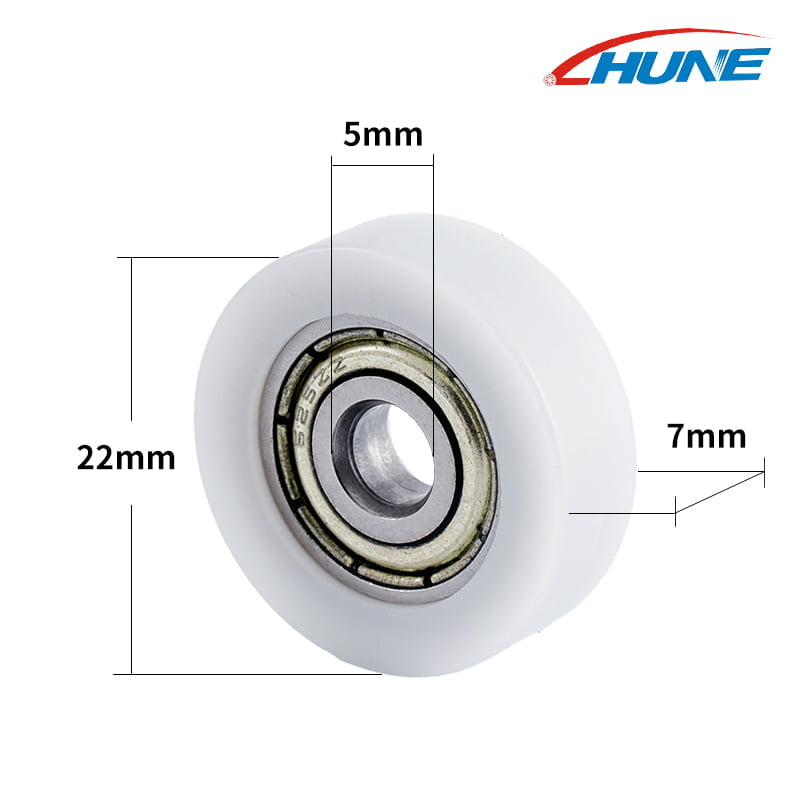
Figure 3. An existing HUNE bearing-wheel product image. The dimensions identify the illustrated component; they do not establish compatibility with a particular thermal printer.
A wheel running against a rigid guide has different requirements from a wheel contacting label stock. A hard polymer bearing wheel is also not a direct replacement for a compliant thermal platen solely because its diameter and bore match. Confirm the role, contact material and mating geometry first.
What Should an OEM Buyer Specify for a Label-Printer Roller?
Provide the operating interfaces and acceptance criteria, not just a sample wheel and an order quantity.
| Requirement | Information to provide | Why it matters |
|---|---|---|
| Component function | Platen, passive idler, mechanical guide or another defined support | Establishes the contact and drive requirements |
| Media contact | Label face, liner underside, liner edge or rigid mating guide | Changes material, surface and marking requirements |
| Running geometry | Functional diameter or profile, contact width and runout datum | Connects the drawing to actual contact behaviour |
| Mounting arrangement | Shaft or axle, bearing seats, retention, spacers and bracket | Controls location, clearance and assembled rotation |
| Duty | Loads, speed, starts, reversals, temperature and contaminants | Determines the conditions the assembly must withstand |
| Supply scope | Material grade, bearing specification, assembly content and demand | Makes quotations and sample approvals comparable |
Also send the label and liner dimensions, sensor-reference details, printing method and output mode where relevant. These describe the system in which the roller will operate; they do not mean the roller supplier can infer the printer's control settings.
Agree on critical dimensions and an inspection method before sample approval. For custom polymer wheels, the comparison of POM roller machining and injection moulding can help assess a prototype route and the intended production process.
Validate geometry first, then evaluate production-representative assemblies with the intended media and operating sequence. Check tracking, rotation, marking and feed consistency during representative starts and reversals. The equipment maker should set the acceptance criteria; a successful short trial should not be presented as a proven service-life result.
Frequently Asked Questions
Do thermal label printers need ink or toner?
Direct thermal printers do not use an ink ribbon or toner; they require compatible heat-sensitive media. Thermal transfer printers use a ribbon carrying the image-forming material. Both still need a mechanism to advance and position the labels. The absence of an ink cartridge therefore does not mean the printer can use any label material or omit media settings.
Can a thermal printer feed fanfold labels instead of a roll?
Yes, if the printer supports the media and an appropriate entry path. Fanfold stock enters from an external stack rather than unwinding from a core. The label dimensions, sensing reference and guide arrangement still need to match the printer. Support for roll labels alone does not establish fanfold compatibility, and the path must accommodate the folds without introducing excessive resistance.
Is the label liner the same thing as a thermal-transfer ribbon?
No. The release liner carries adhesive labels through the feed path and may be separated at a peeling stage. Thermal-transfer ribbon passes between the printhead and label to form the image, then travels to its own take-up. A direct thermal printer can use liner-backed labels without using any ribbon. Confusing these layers can lead to an incorrect media-path drawing.
Can a printer designed for liner-backed labels also feed linerless labels?
Only if the printer and its transport components are designed or approved for that media. Removing the liner changes which surfaces encounter adhesive and how the material releases from rollers and guides. It can also change cutting and presentation requirements. A matching roll width or core size is insufficient evidence of compatibility with a linerless label construction.
Discuss a Label-Printer Roller Project with HUNE
HUNE manufactures sliding rollers, plastic bearing wheels and hardware components for OEM applications. Its sliding rollers with bearing range offers structures to compare when a label-printer mechanism needs a compact rolling guide or support.
Start by identifying the component's contact function and its place in the feed path. Then review the running surface, bearing arrangement, mounting geometry and actual media together.