
How do you calibrate a 3D printer when bed leveling alone does not produce consistent prints?
To calibrate an FDM 3D printer, first confirm that its frame and motion system are stable. Then complete the model's bed alignment, nozzle-height and first-layer procedures. Check extrusion delivery, tune the filament profile, and validate dimensions and surface quality with repeat prints. On printers using V-slot guide wheels, check wheel contact and bearing play before adjusting software settings.
I start with mechanical repeatability because a carriage that rocks or binds changes the conditions under which every later adjustment is made. This guide covers filament printers, including machines with wheel-guided axes. Printers using linear rails or round shafts require their own guide checks; resin printers follow a different calibration process.
What Is the Right Order for 3D Printer Calibration?
Work from stable hardware to material settings, changing one variable at a time.
Before starting, save the existing firmware configuration and slicer profile. Confirm the printer model, installed nozzle diameter, build surface and filament type. Use the manufacturer's baseline profile and built-in calibration sequence where available.
Prepare the printer's supplied tools, a suitable measuring tool and a small calibration model. Use dry filament and a clean build surface so that moisture or contamination does not obscure the result.
Follow this sequence:
- Check the frame, gantry, belts and guide assemblies.
- Verify homing, bed alignment and nozzle-height calibration.
- Print and inspect a first-layer test.
- Verify filament delivery if there is evidence of an extrusion error.
- Tune temperature and flow for the selected filament.
- Refine retraction and supported motion-compensation settings.
- Check finished parts, repeat the test and save the working configuration.
A factory-configured machine may already have correct drive and motion settings. Verification is useful; replacing working factory values without evidence is not a necessary calibration step.
Step 1: Check the Frame, Guide Wheels and Bearings
The carriage should travel consistently without rocking, binding or a repeating tight spot.
With the printer cool and in the inspection state specified by its manufacturer, check frame joints, gantry alignment, carriage fasteners and bed supports. Follow the machine's procedure for moving an axis by hand; do not force a locked drive or unsupported gantry.
Inspect belt alignment, attachment points and tension using the manufacturer's method. Excessive belt tension can load the motor bearings and carriage unnecessarily. A loose drive pulley can create lost motion that software calibration will not remove.
Where do bearing rollers fit into the printer?
In a wheel-guided printer, the complete assembly includes the plastic wheel, bearing, axle or bolt, spacers, carriage plate and aluminium extrusion. Several wheels constrain the carriage while allowing it to move along the rail. Depending on the design, that carriage may carry the print head, bed or gantry.
HUNE's [V-slot guide wheel with a 625 bearing for 3D printers]is an example of this architecture. Its suitability depends on the actual rail section and mounting arrangement; the product name alone does not establish compatibility with a particular printer.
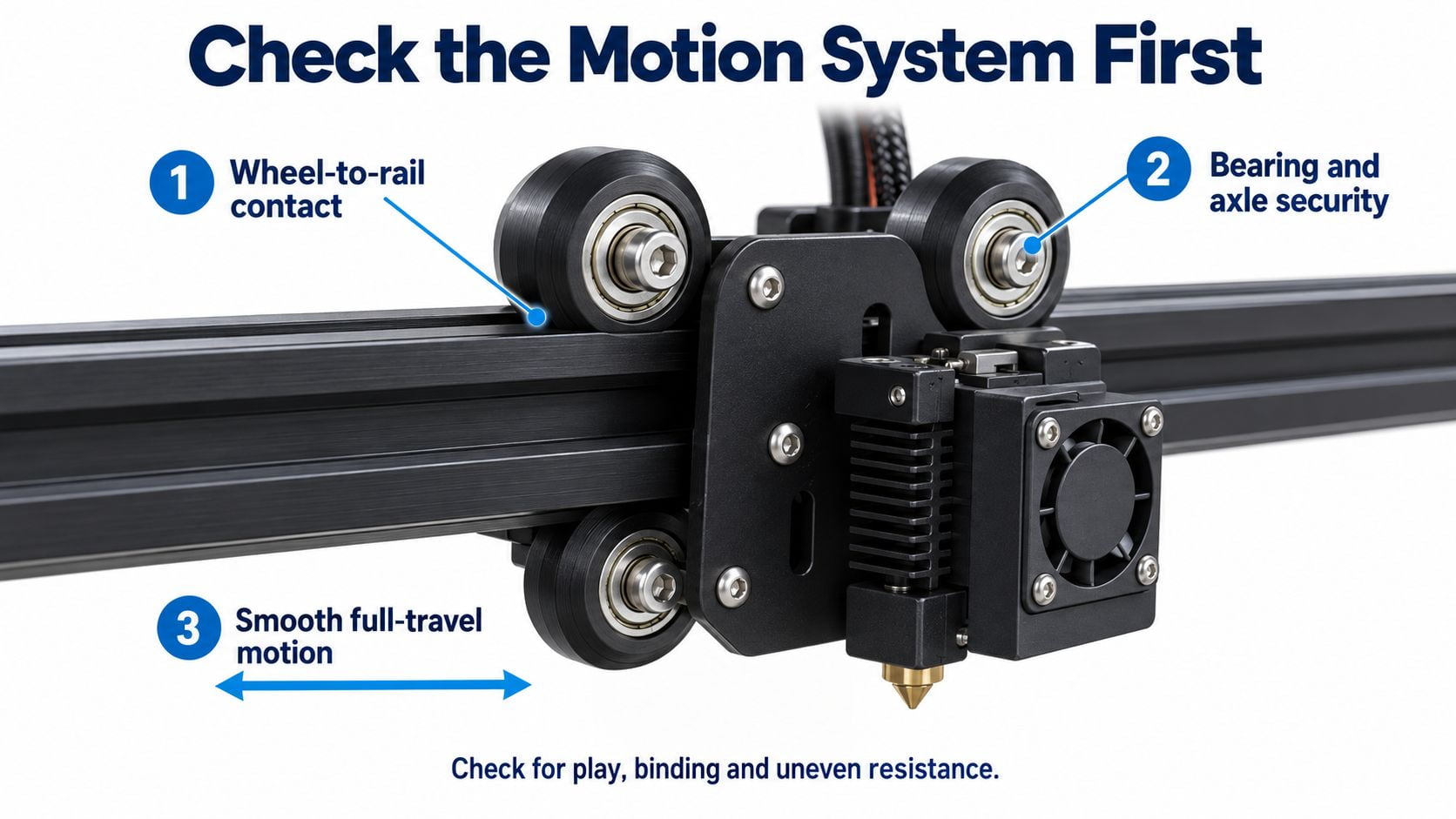
The plastic running surface and central bearing perform different jobs: one contacts the guide profile, while the other allows rotation around the axle.
Check the carriage at several positions along its travel. Gently test for rocking, then look for wheel damage, uneven contact, loose mounting hardware or rough bearing rotation. Compare resistance along the axis, rather than judging the assembly only at its home position.
How tight should the guide wheels be?
Where an eccentric spacer or adjuster is provided, use the printer's prescribed adjustment method. The aim is enough contact to constrain the carriage while preserving smooth travel. Recheck the full stroke after each adjustment.
Overtightening can increase drag and deform the plastic contact surface. Insufficient contact can allow the carriage to tilt as the drive changes direction. If smooth travel and stable guidance cannot be achieved together, inspect the wheel profile, rail alignment and bearing assembly before adding more preload.
Our guide to matching V-groove rollers to aluminium extrusion explains the contact geometry behind this decision.
Illustrative motion assembly: check wheel-to-rail contact, bearing and axle security, and smooth travel before calibration.
Check the Frame, Guide Wheels and Bearings## Step 2: Align the Bed and Establish Nozzle Height
Bed alignment, Z offset and mesh compensation address different parts of the nozzle-to-bed relationship.
Tramming aligns the bed with the nozzle's travel plane. Z-offset calibration establishes the nozzle height relative to the machine's reference. A bed mesh maps surface variation for compensation during motion.
Use the calibration sequence for the installed printer and probe. Typically, this includes homing, bed or gantry alignment, nozzle-height calibration and mesh generation where supported. If an adjustment changes the probe-to-nozzle relationship, repeat the affected calibration.
Temperature conditions depend on the procedure. For example, Klipper's bed-leveling guide specifies a cold paper test and explains thermal expansion. Follow your machine's procedure for warm-up, probing and first-layer verification instead of applying one temperature rule to every method.
Keep the nozzle and build surface free of residue. Afterward, confirm that the required offset and mesh are saved or regenerated and actually used by the print-start sequence.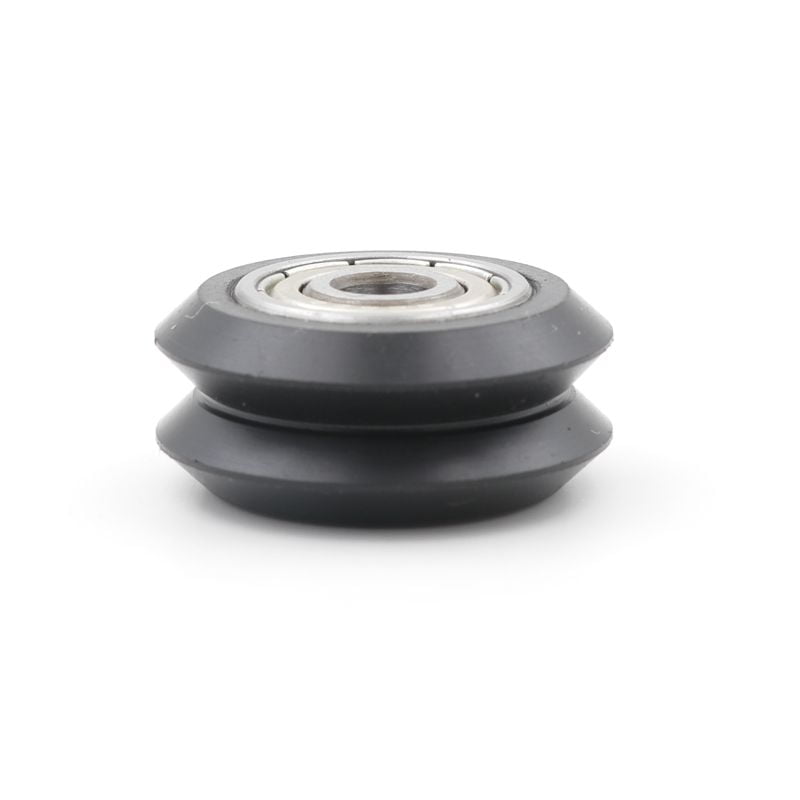
Step 3: Verify the First Layer With a Print
A printed first layer checks the combined result of nozzle height, extrusion and surface preparation.
Run the printer's first-layer routine or print a small, single-layer patch using the correct nozzle and material profile. On machines that permit live Z adjustment, make small changes through the supported control.
- Rounded, separated lines can indicate that the nozzle is too far from the surface.
- Excessively flattened lines or raised ridges between passes can indicate that it is too close.
- The target is an even patch with connected lines and reliable adhesion.
These visual comparisons are illustrated in Prusa's first-layer calibration guide. Its menu commands and numerical offsets are specific to the listed machines.
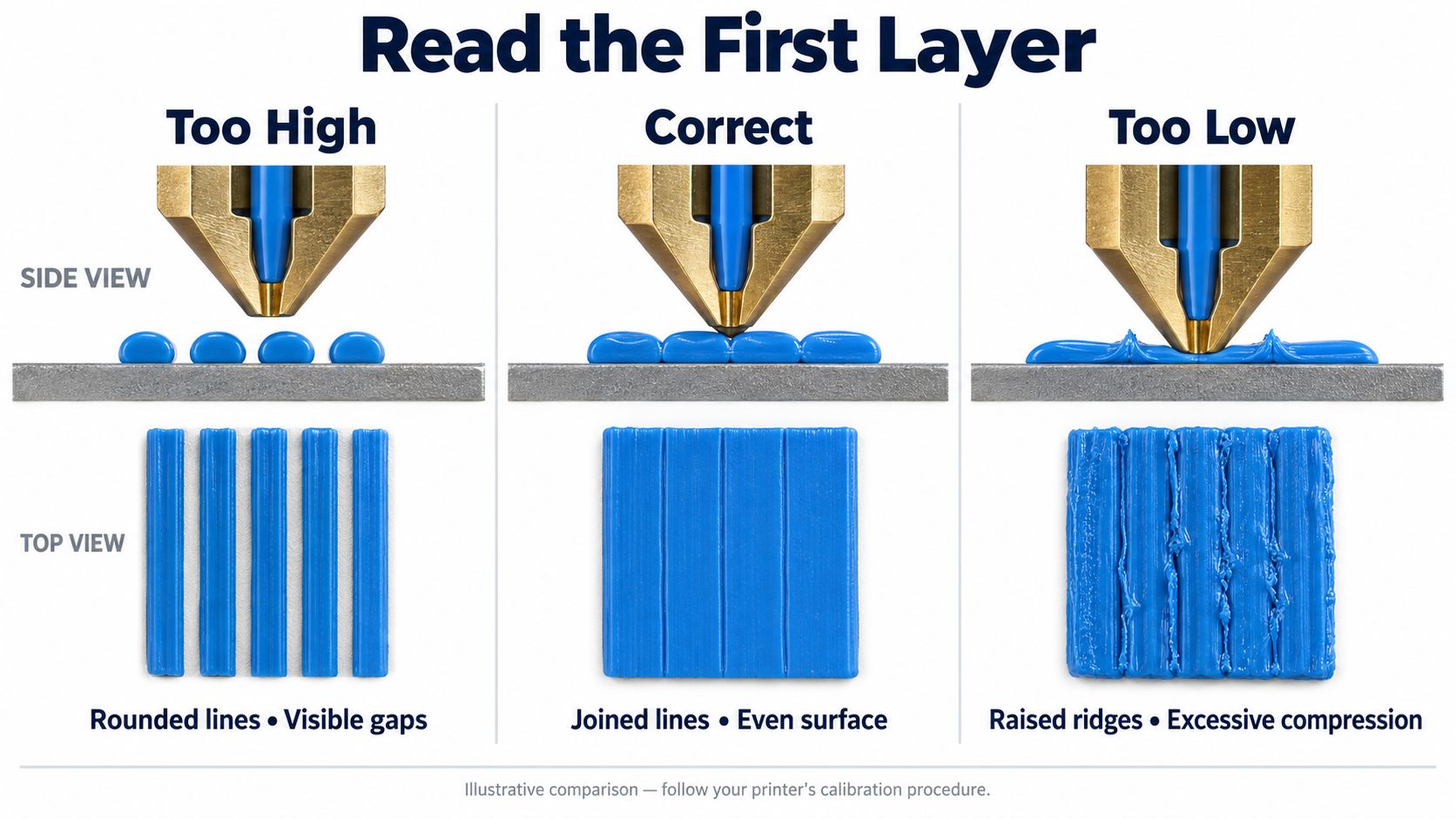
Compare the nozzle gap and printed line pattern together. These illustrations show typical visual differences, not measured results from a specific printer.
Check more than one bed position. If the same area changes between otherwise identical runs, investigate repeatability before repeatedly changing the offset. First-layer appearance is evidence, not a unique diagnosis: contamination and inconsistent extrusion can also produce poor results.
Step 4: Check Extruder Calibration Without Altering Axis Geometry
Filament delivery and carriage travel use different calibration logic.
If extrusion is inconsistent, first check spool resistance, drive-gear grip and the filament path. A slipping extruder or restricted nozzle can invalidate a measurement.
On a configurable printer that supports manual extruder calibration, use its documented procedure: mark the filament relative to a fixed reference, command a known length at the specified slow rate, and measure actual movement. Heat the hotend appropriately when feeding through the nozzle. Repeat a questionable measurement before saving a correction.
For Klipper, the relationship is:
New rotation_distance = previous rotation_distance × actual filament movement ÷ commanded filament movement
The official rotation-distance documentation explains the procedure and distinguishes it from setting belt-driven or leadscrew axes. Steps-per-millimetre firmware uses a different correction relationship; do not copy this formula into an E-steps field.
A freely rotating guide wheel supports the carriage. In a conventional belt-driven printer axis, its outside diameter does not set commanded travel. That relationship comes from the drive hardware and kinematics. Do not change X/Y motion scaling simply because a replacement guide wheel has a different diameter.
Step 5: Tune Temperature and Filament Flow
Choose stable material settings before trying to optimise speed.
Start with the filament manufacturer's temperature range and the printer's matching profile. If a temperature test is needed, use a tower or equivalent controlled sample and confirm that the generated print file actually changes temperature between test sections.
Compare layer bonding, surface appearance, bridging and extrusion consistency at the intended printing speed. Keep cooling and other variables consistent during the comparison. A temperature selected for a slow decorative print may need review for a faster production profile.
Flow calibration is a separate adjustment. Print a suitable top-surface test, compare small changes in the slicer's extrusion multiplier, and retain the setting that gives continuous, even fill without material buildup. Keep the firmware flow multiplier at its known baseline so the two adjustments do not unintentionally compound.
Prusa's extrusion multiplier guidance explains this interaction and why the preferred setting can vary with filament. A large correction should prompt another check of the nozzle, filament diameter setting and feed mechanism.
Save the result with the material and nozzle profile. It should not be treated as a universal value for every spool or machine.
Step 6: Refine Retraction and Motion Compensation
Advanced tuning works best after the mechanical and extrusion baseline is consistent.
Use a retraction test to compare travel moves between separate printed features. Begin with the extruder manufacturer's settings and vary one parameter at a time. Direct-drive and Bowden systems can require different settings; copying a distant printer's profile may introduce new problems.
Where supported, pressure advance adjusts extrusion during changes in speed. Use the firmware's test procedure after establishing a stable material profile. Compare corner quality and avoid combining several unrecorded extrusion changes in one test.
Input shaping addresses vibration-related ringing. Klipper's resonance compensation documentation recommends checking mechanical causes first and describes the trade-off between vibration reduction and smoothing. Run the supported measurement or tuning routine with the intended tool-head configuration.
For a wheel-guided machine, repeatable carriage contact is part of that baseline. Software compensation cannot restore a damaged running surface or reliably remove movement caused by loose mounting hardware.
Step 7: Validate Dimensions and Repeatability
One acceptable calibration cube is a useful check, but it does not establish accuracy across the whole machine.
Measure a cooled test part at several locations. Include features relevant to the intended work, such as outside dimensions, holes, mating clearances and wall surfaces. Avoid relying only on the bottom edge, where first-layer compression can affect the result.
I would repeat the same print before accepting a dimensional correction. A consistent size bias and a result that changes between runs call for different investigations.
| Observation | Check before making another calibration change |
|---|---|
| Dimensions vary between identical prints | Carriage play, drive security, extrusion consistency and temperature conditions |
| Error changes across the build area | Frame geometry, gantry alignment, guide contact and bed referencing |
| Holes and outside dimensions need different corrections | Slicer geometry compensation, material behaviour and measurement method |
| Surface defects repeat with carriage position | Rail condition, wheel running surfaces, bearing rotation and drive components |
| Ringing appears after sharp changes of direction | Mechanical rigidity, moving mass, acceleration and supported input-shaping settings |
Do not use a small printed cube alone to redefine the printer's axis travel. Printed dimensions also include material shrinkage, extrusion width, cooling and toolpath effects.
Save the approved firmware settings and slicer profile, then confirm that they remain active after a restart. Record the test file, material, nozzle, temperatures and any mechanical adjustments so another operator can reproduce the setup.
What Should OEM Buyers Specify for 3D Printer Bearing Rollers?
Specify the installed guide assembly and acceptance method, not only the wheel's outside diameter.
For equipment manufacturers, calibration effort can expose variation in component fit. If each carriage requires a different adjustment to achieve acceptable guidance, investigate the wheel, rail and mounting stack together.
The functional drawing should identify the wheel's contact profile, bearing seats, axle interface, overall assembly width and relevant running surfaces. Define radial runout relative to the installed bearing or another agreed functional datum. Wheel width and bearing position also determine whether the mounting stack clears the carriage plate.
In assemblies with two bearings, the internal spacer and clamping arrangement need particular attention: tightening the axle should secure the intended stack without introducing unintended bearing preload.
For a supplier review, send:
- The wheel drawing and mating extrusion section, with revision numbers.
- The bearing specification, axle or bolt details, spacers and carriage arrangement.
- Moving mass, load direction, travel speed, acceleration and duty cycle.
- Expected enclosure temperature, dust exposure and material requirements.
- Functional tolerances, inspection datums and acceptable installed play or running resistance.
- Prototype quantity, expected annual demand and the intended validation plan.
Agree on acceptance criteria from the actual machine requirements rather than imposing an arbitrary tight tolerance on every surface. A generic material name such as POM is also incomplete where grade or temperature exposure affects the design.
For a new wheel geometry, the choice between machining and injection moulding a POM roller should reflect design maturity and expected demand. Approve production-intent samples in the assembled carriage, including full-travel and repeat-motion checks, before releasing volume supply.
Frequently Asked Questions
Do I need to recalibrate a 3D printer before every print?
Usually, a complete calibration sequence is unnecessary before every job. Use the printer's normal startup checks and any automatic routines specified by its manufacturer. Revisit the affected settings after hardware changes, relocation or a persistent change in results. A filament change may require a material-profile check without requiring new wheel adjustment or axis configuration.
Can automatic bed leveling compensate for loose guide wheels?
Automatic bed leveling relies on the nozzle and probe following a repeatable path. If a loose carriage tilts differently during probing and printing, the measured surface no longer describes the same mechanical condition. Correct the guide assembly first, then repeat the affected bed and nozzle-height procedures. Increasing mesh density does not remove physical play.
Should I replace POM wheels with metal wheels for better calibration?
A material substitution needs an engineering review. Metal wheels change the contact pair, compliance, mass and potentially rail wear. Confirm the extrusion geometry, contact stresses, bearing arrangement and operating environment before making the change. A correctly specified plastic wheel can be appropriate for the original guide design; material hardness alone does not establish better positioning.
Does changing a guide wheel require new extruder calibration?
A guide-wheel change does not directly change the extruder's filament-drive ratio. Recheck carriage contact, travel, bed referencing and first-layer performance because the new assembly can change tool-head or platform position. Revisit vibration tuning if the mechanical response changes. Extruder calibration becomes relevant when the filament-drive hardware or evidence of filament delivery changes.
Discuss a Bearing Roller for Your 3D Printer Project
HUNE manufactures sliding rollers with bearings and custom hardware components for OEM applications. Its bearing roller product range includes constructions that can be evaluated against the rail, axle and operating conditions of an equipment project.
For a printer using wheel-guided motion, establish stable mechanical travel before finalising calibration settings. If you are sourcing a roller assembly, send HUNE your drawing and application requirements, including the mating extrusion, bearing arrangement, moving load, critical dimensions and expected quantity. Use that information to agree on a sample assembly and an installed validation method before approving production.