A drive roller receives torque from a motor, gear train or belt and uses surface traction to move paper. An idler roller is not normally connected to the main drive. It rotates because the paper, a belt or an opposing drive roller moves beneath it. In a common printer nip, the drive roller supplies tangential feed force while a spring-loaded idler, also called a pinch roller, supplies the normal force that keeps the paper in contact.
The distinction is functional rather than visual. Two rollers of similar size can require different shafts, bearings, surface materials and tolerances. The drive side must transmit torque without excessive runout or slip. The idler side must rotate freely, follow thickness variation and apply controlled pressure. OEM buyers should therefore specify each roller's role and mating geometry, not request a generic “printer roller.”
Drive Roller and Idler Roller: The Essential Difference
The drive roller creates motion; the idler roller supports, presses or redirects the moving element.
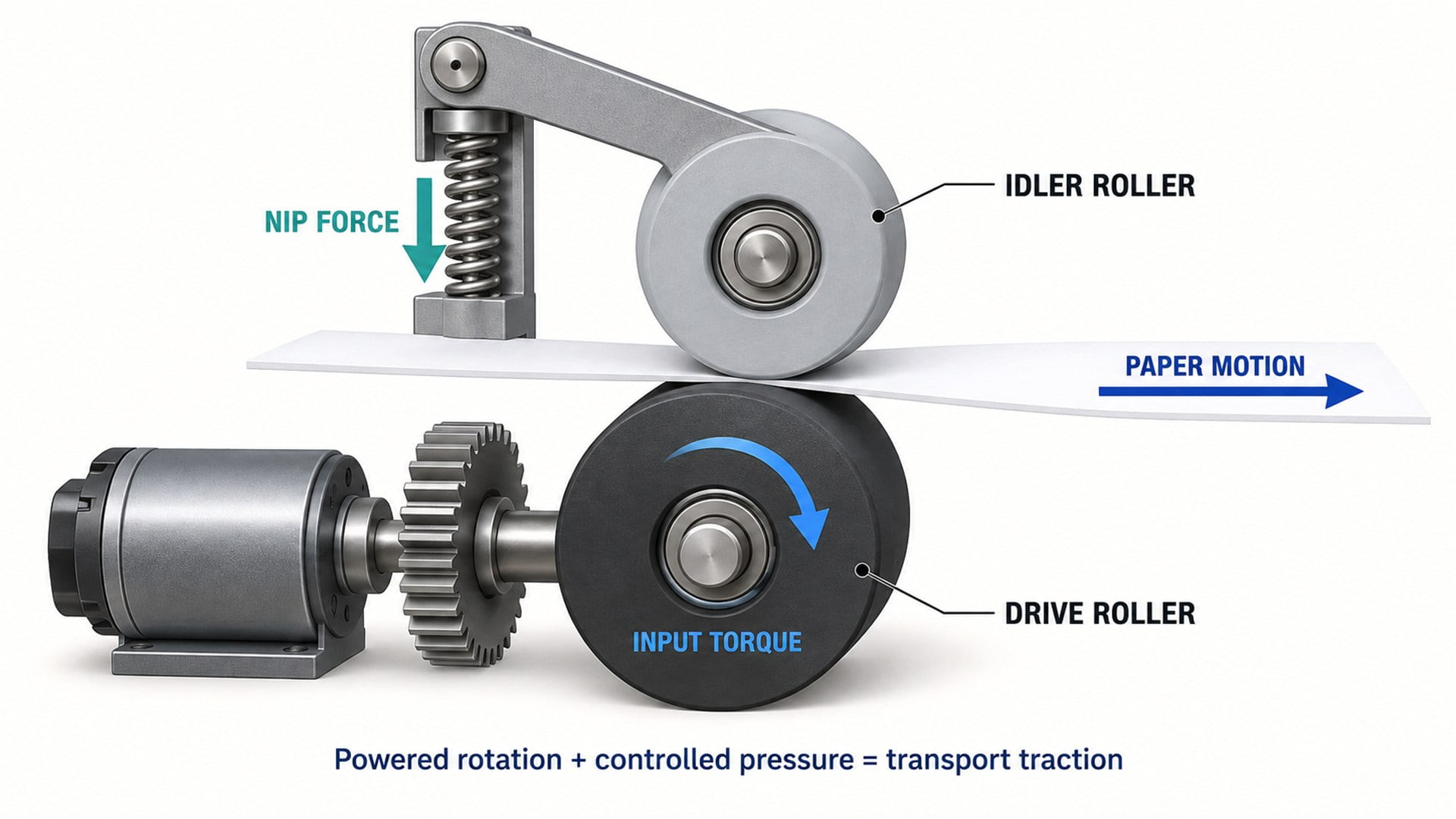 Conceptual comparison. The exact drive train, bearing arrangement and spring mechanism vary by printer design.
| Design question | Drive roller | Idler roller |
|---|---|---|
| Where does rotation come from? | Motor, gearbox, timing belt, gear or driven shaft | Contact with paper, belt or opposing roller |
| Primary job | Generate paper motion and control transport speed | Maintain contact, support the path, guide a belt or provide nip pressure |
| Main mechanical load | Torque plus radial nip load | Mainly radial load, spring load and bearing drag |
| Typical shaft relationship | Roller fixed to, keyed to or molded around a driven shaft or hub | Roller rotates freely on a stationary pin, axle or bearing |
| Important performance risks | Slip, eccentricity, torsional failure, speed error and surface wear | Excessive drag, uneven pressure, noise, seizure and misalignment |
| Common surface requirement | Sufficient and stable traction on the intended media | Controlled compliance, low marking and predictable contact pressure |
| Drive interface required? | Yes | Usually no |
Printer terminology is not perfectly uniform. “Idler roller” can describe the free-turning member opposite a drive roller, a roller that supports or tensions a transport belt, or a guide roller that changes the direction of roll media. A “pinch roller” usually identifies an idler whose specific job is to press media against a driven surface. The assembly drawing should define the function instead of relying on the name alone.
What Does a Drive Roller Do in a Printer?
A drive roller converts motor torque into controlled linear movement of the print medium.
The drive roller may be connected directly to a geared motor, mounted on a driven shaft, coupled through gears, or synchronized with other shafts by a belt. At the paper contact, its circumferential speed contributes to sheet speed. If the effective roller diameter changes, the relationship between shaft rotation and paper travel changes as well.
That is why the functional diameter matters more than the outside dimension printed on an isolated part drawing. Compression at the nip, coating thickness, molded eccentricity, wear and contamination can all change the effective rolling condition. In printers that position media in small increments, variation can appear as registration error, image-length error or banding rather than a complete feed failure.
A drive roller also needs a positive torque path. Depending on the design, that path may use a D-shaped shaft, keyed bore, interference fit, splines, an overmolded insert or an integral gear. A plain bearing bore that works well for a free-running idler does not automatically make a reliable drive connection.
The drive roller is only one element in the complete printer paper-feed system. Motor control, shaft stiffness, adjacent nips, guides, sensors and media properties determine whether its available traction produces accurate transport.
What Does an Idler Roller Do in a Printer?
An idler roller completes the contact condition without requiring its own powered drive.
When positioned opposite a drive roller, the idler pushes paper into the driven surface. A spring, flexible arm, elastomer feature or gravity can create the radial load. The idler then turns as the media and drive roller move through the nip.
This apparently passive role is mechanically important. If the idler bearing or bore has excessive resistance, part of the available traction is spent overcoming roller drag. If its spring force is too low, the nip can slip. If the force is too high or concentrated, the mechanism can mark coated media, increase motor demand or deform thin sheets.
Some idlers do not oppose a drive roller. They may guide paper around a curved path, support a moving belt, establish belt wrap or maintain roll-media tension. US patent documentation for an idler roll with a retard-spin function distinguishes motor-coupled drive rollers from freely rotating idlers and also describes idlers used around paper guides without an opposing drive roll. This is a useful reminder that “idler” describes how the roller is driven, not one universal location.
For compact idler assemblies, a plastic-coated bearing roller can combine the rolling surface and bearing function. Its suitability still depends on load, speed, media contact, coating, mounting and contamination conditions.
How Do the Two Rollers Work Together at the Nip?
Paper transport depends on both tangential traction and controlled normal force.
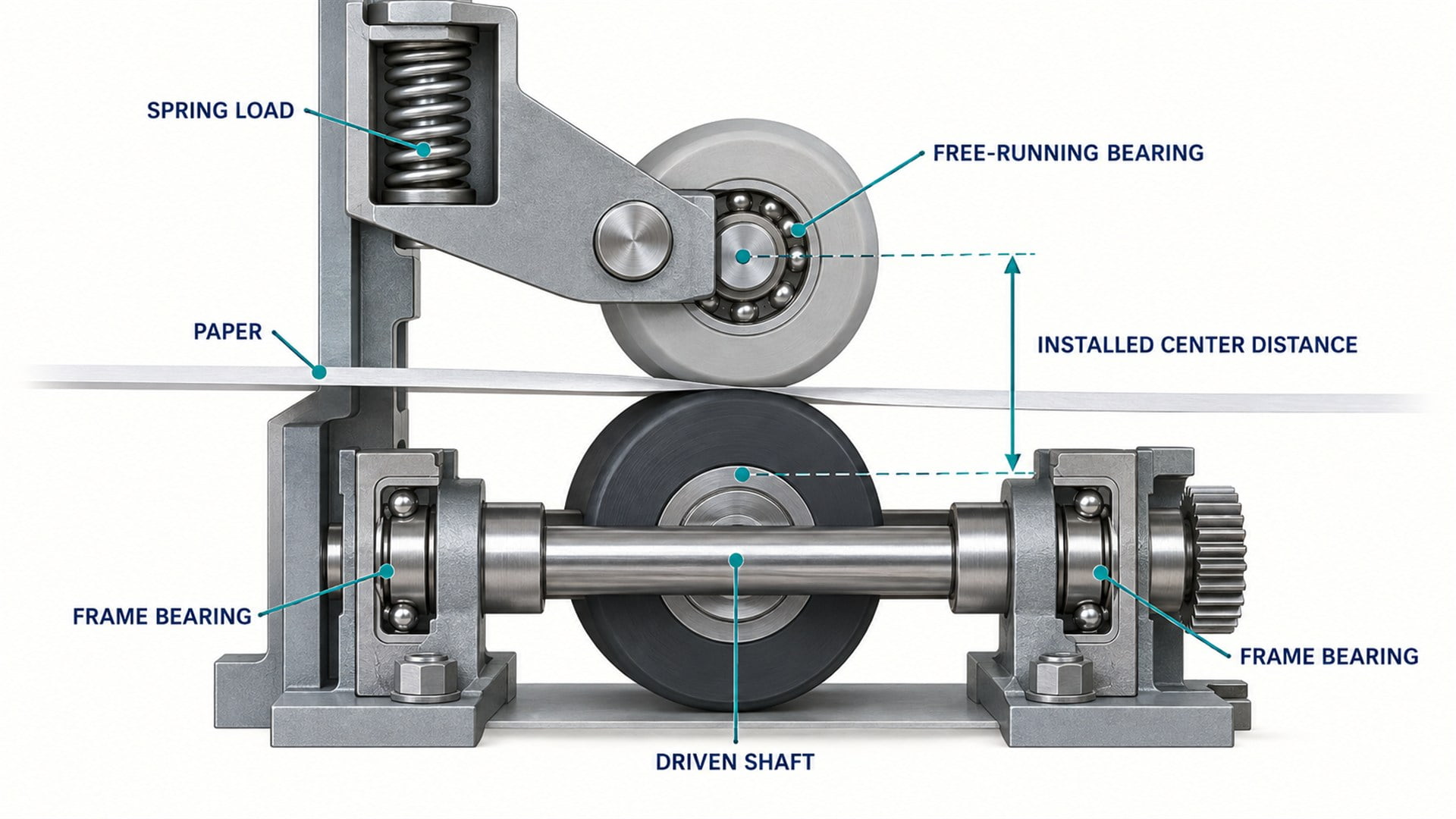 Simplified nip load path. It shows functional forces rather than a universal printer construction.
At a typical feed nip, the powered roller applies a tangential force to the paper. The idler provides the normal force that allows friction to develop at the contact. The available feed force therefore depends on the contacting materials, surface condition and nip load together.
The mechanism must also accommodate media thickness. A spring-loaded idler can move slightly as paper enters while preserving contact. A rigidly fixed gap may work over a narrow range but can lose traction on thin media or produce excessive pressure on thick media.
US patent documentation for a pivoting printer roller nip describes a driven shaft opposed by spring-loaded idlers. It explains that the spring arrangement accommodates roller-diameter and shaft-position variation while providing clamping force. The same source also shows why frame and door stiffness matter: if the idler support moves under sheet tension, the nip can open enough to lose traction.
In my engineering judgement, buyers should treat the drive roller, idler, spring and mounting structure as one force system. Specifying the rollers without the installed center distance or target nip condition leaves the supplier to guess at the most important interface.
Can an Idler Roller Ever Drive the Paper?
An idler can transmit motion locally, but it remains an idler if it receives no commanded torque from the drive train.
The free roller rotates and contacts the opposite face of the sheet, so both sides of the nip move. That does not make both rollers powered. The drive roller controls the motion; the idler follows through friction.
Terminology becomes more complicated in belt transports. A powered roller drives the belt, while several idlers support, tension or redirect it. The belt then carries the paper. In this arrangement, the paper may never touch the powered roller directly. A patent for a bidirectional print-media transport illustrates motor-driven rolls cooperating with idler rolls to form transport nips and shows how roller arrangement determines the direction of media movement.
The practical sourcing question is always: where does torque enter the assembly? If torque enters through the roller shaft, hub, gear or belt interface, that member is part of the drive. If the roller merely follows contact, it requires a free-running support design.
How Do Their Shafts and Bearings Differ?
Drive rollers need torque transmission and alignment; idlers need low, consistent rotational resistance.
A drive shaft is commonly supported at the printer frame by bearings or bushings. Several roller segments may be fixed to the same shaft so they rotate together. The shaft must resist torsional wind-up and bending while keeping the roller contact lines aligned across the media width.
An idler often rotates on a fixed pin or uses a small rolling bearing around a stationary stud. Other designs use a freely rotating idler shaft supported at both ends. The selection affects starting torque, noise, axial freedom, assembly cost and resistance to paper dust.
The phrase “roller with bearing” can therefore refer to several architectures:
- a plastic or elastomer wheel molded around a miniature ball bearing;
- a plain-bore roller running directly on a polished pin;
- a roller fixed to a shaft whose ends run in frame bearings;
- a roller containing a sleeve or sintered bushing;
- a complete stud-mounted roller with washers, spacers and fastener.
Our guide to what bearings do in printer rollers explains how bearing resistance, runout and mounting affect the paper path. For procurement, the bearing designation alone is insufficient. Shaft fit, inner-ring clamping, axial retention and the rotating member must be shown.
Which Roller Materials and Surfaces Are Used?
Surface selection follows the contact job, media and environment.
Drive rollers often use rubber or another compliant, high-traction surface where they contact paper directly. Some printers use textured engineering plastics, coated metal shafts or segmented elastomer rings. The appropriate surface depends on paper coating, dust, speed, pressure, temperature, required life and sensitivity to marking.
Idler rollers may use elastomer, engineering plastic, coated bearings or metal. An idler that presses paper against a drive roller has different surface requirements from a belt-support roller. Low marking may be more important than maximum friction, while compliance helps distribute load and accommodate tolerance.
Material names should not substitute for functional requirements. “POM roller” does not define surface texture, concentricity, bearing fit or performance against the mating member. Similarly, a rubber hardness value does not describe the whole nip unless the coating thickness, geometry and force are also known.
HUNE's flat roller wheels illustrate a compact coated-bearing format that may suit guide or idler positions after the complete operating conditions are reviewed. For direct media contact, the surface must be evaluated for traction, marking and compatibility with the intended paper or label stock.
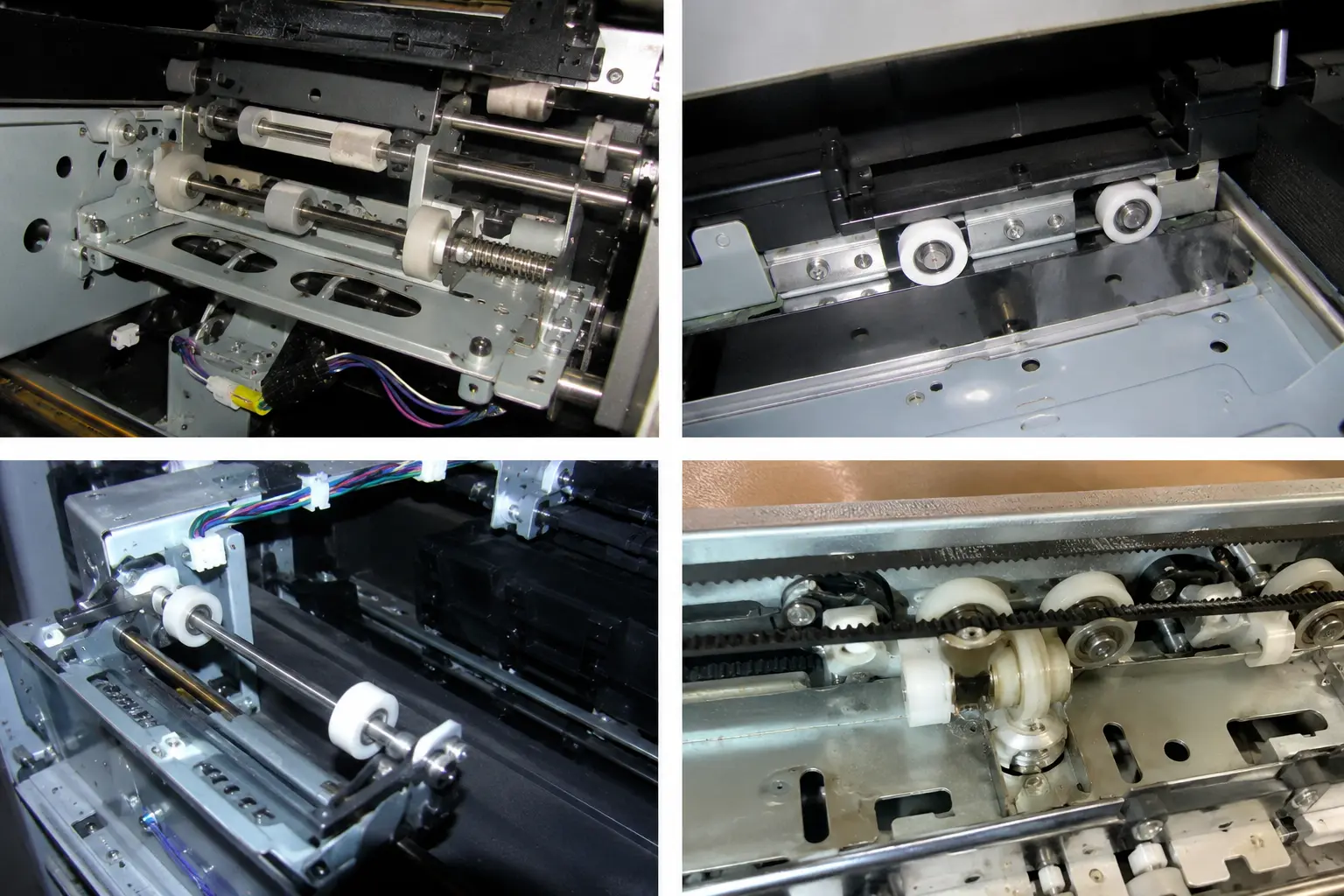 HUNE plastic-coated bearing roller concepts. Final geometry and material should be matched to the printer assembly.
Which Dimensions and Mating Features Matter Most?
The critical dimensions are the ones that control speed, nip position, force and assembly.
For a drive roller, review:
- effective outside diameter and allowable variation;
- total indicated runout relative to the driven shaft datum;
- roller width, segment spacing and contact position across the sheet;
- shaft diameter, drive-flat, spline, key, gear or insert geometry;
- coating thickness and edge profile;
- shaft support span and bearing-seat locations;
- axial location relative to gears, guides and sensors.
For an idler roller, review:
- outside diameter, width and crown or flatness of the contact surface;
- bearing or bore size and running fit on the pin;
- axial clearance, spacer stack and retention method;
- installed center distance to the opposing roller;
- idler-arm pivot location and available travel;
- spring location, force direction and working range;
- alignment of the idler axis with the drive axis.
The mating geometry connects these lists. The roller pair must be considered at installed condition, including frame tolerance and media thickness. A perfectly concentric wheel can still feed poorly if its shaft is angled relative to the opposing roller or if the spring loads one end more strongly than the other.
What Failure Symptoms Point to Each Roller?
Different symptoms suggest different parts of the roller system, but inspection should confirm the cause.
| Symptom | Drive-side possibilities | Idler-side possibilities | Other interfaces to check |
|---|---|---|---|
| Paper stalls or slips | Worn or contaminated traction surface; loose hub; drive-train loss | Insufficient nip load; seized or high-drag idler | Motor control, media finish, guide drag |
| Sheet skews | Unequal drive diameter or shaft runout across width | Uneven spring force, idler drag or axis misalignment | Tray guides, registration system, frame datum |
| Repeating speed error or banding | Effective-diameter variation or eccentric drive roller | Periodic idler runout or pressure variation | Encoder, motor control, platen condition |
| Paper marking | Contaminated or overly aggressive surface | Excessive pressure or narrow contact | Ink state, guide contact, debris |
| Noise | Gear, bearing or surface problem on driven shaft | Bearing drag, free-spin chatter or loose retention | Frame resonance, belt tension, covers |
Replacing the visible roller may not remove the root cause. For example, a new idler installed on a damaged pin can retain excessive drag. A new drive roller on a bent shaft can retain cyclic runout. I would inspect the shaft, support and spring together before approving a corrective part change.
Official HP training documentation notes that visually similar drive and idler rollers can have different functions. This is directly relevant to service parts and procurement: appearance and color alone are not reliable interchangeability criteria.
What Should an OEM Buyer Send to a Roller Supplier?
A useful inquiry defines the operating role, interfaces and acceptance condition.
Send the following information when possible:
- A paper-path drawing showing whether the part is powered, spring-loaded, belt-contacting or free-guiding.
- A dimensioned roller and shaft drawing with datums, fits, runout requirements and axial retention.
- The mating roller, belt or paper-contact geometry, including installed center distance.
- Media types, width and thickness range, coating condition and sensitivity to marking.
- Rotational speed, duty pattern, direction changes and expected service environment.
- Drive torque or target nip condition where it is already established by the system design.
- Material, hardness, color and regulatory requirements that are actually necessary.
- Sample quantity, validation quantity and expected production volume.
- Assembly method, packaging constraints and any traceability requirement.
- Photos or samples of the present assembly if a complete drawing is unavailable.
Avoid asking only for “the same roller” from a photograph. The supplier cannot see the torque path, shaft fit, internal bearing or spring condition from an exterior view. A clear functional description reduces redesign and helps determine whether an existing bearing roller configuration can be adapted or a new molded component is required.
FAQs
Is a printer pinch roller the same as an idler roller?
Usually, a pinch roller is a type of idler roller that presses paper, labels or film against a driven roller. However, “idler” is broader and can also describe belt-support, tensioning or path-guiding rollers that do not form a paper-feed nip.
Does every drive roller need a rubber surface?
No. Rubber and elastomer coatings are common because they provide compliance and traction, but some systems use textured plastic, coated metal or a powered belt. The correct surface depends on the media, nip force, speed, contamination and marking limits.
Can a bearing roller be used as a printer idler?
Yes, if its diameter, width, rotational resistance, material, load capacity, mounting and contamination resistance match the application. The supplier must also review the shaft fit, axial retention and contact with the mating roller or media.
Why does an idler roller need a spring?
A spring allows the idler to follow media-thickness and assembly variation while maintaining normal force at the nip. It is not universal: some idlers use gravity, compliant arms or fixed geometry, and belt-support idlers may not press paper against another roller.
Discuss Your Printer Roller Application with HUNE
The fastest sourcing route is to define the roller's function inside the complete paper path.
HUNE develops custom sliding rollers, plastic-coated bearing rollers and related precision hardware for OEM equipment. For printer projects, we can review whether the part is a powered roller, a free-running idler, a pinch roller or a bearing-supported guide, then assess the wheel, bearing, shaft and mounting interfaces as one assembly.
Send us your drawing, sample, paper-path sketch, media range, mating geometry, quantity and operating requirements through the HUNE contact page. We recommend confirming the torque path and installed nip condition before finalizing material or bearing selection.