Packaging machines keep film moving smoothly by controlling tension, traction, alignment and timing as one coordinated web-handling system. The unwind supplies film without sudden torque changes. Dancer rollers or load cells regulate tension. Low-inertia idler rollers support the path, while driven nip rollers or pull belts provide deliberate grip. Edge guides correct lateral movement, registration sensors align printed marks, and the motion controller synchronizes film feed with sealing and cutting.
No single roller creates smooth transport. I normally evaluate the complete path: film roll → unwind brake or motor → dancer → guide rollers → edge control → drive rollers or belts → forming section → sealing and cutting. Roller runout, bearing drag, shaft alignment, surface material, wrap angle and film properties all affect the result. The correct OEM design keeps the film taut enough to track accurately without stretching, scratching, wrinkling or slipping.
What Does “Smooth Film Movement” Actually Mean?
Smooth transport means the film follows the intended path at controlled tension and position while the machine maintains package length, seal location and surface quality.
Flexible packaging film is a continuous web. Unlike a rigid part on a conveyor, it can stretch, wrinkle, curl, neck down, trap air, build static and move sideways. A machine may appear to run smoothly while still producing unacceptable bags because the printed registration drifts or the film elongates between the encoder and sealing jaws.
For an OEM, useful performance criteria include:
- stable tension in each functional zone;
- consistent film velocity during acceleration, running and stopping;
- no slip where motion or length is measured;
- controlled lateral position at the forming, sealing or cutting station;
- acceptable wrinkle, curl and edge condition;
- repeatable printed-mark registration;
- no scratching, blocking or adhesive buildup on the web;
- acceptable roller temperature, vibration and noise; and
- consistent results as the unwind roll diameter changes.
The target is not maximum tension. Excess tension can stretch thin film, distort printed graphics, change bag length or overload seals. Insufficient tension can create loops, wrinkles and unstable tracking. The operating window depends on film thickness, modulus, friction, width, coatings, print, temperature and machine speed.
What Functions Control the Film Path?
A packaging machine divides film transport into functional zones so that one disturbance does not travel through the whole machine.
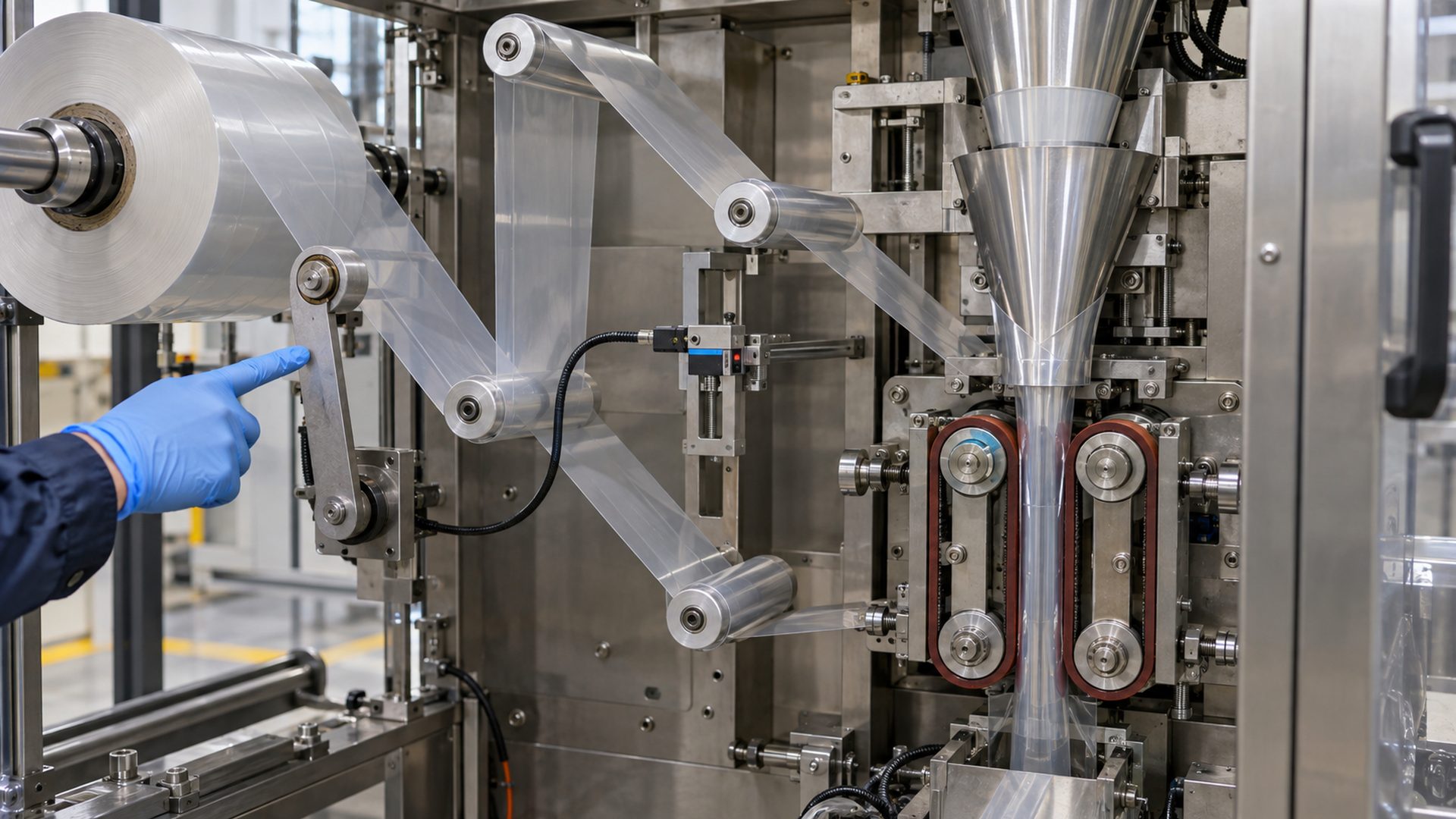 The unwind, dancer, guide rollers, edge control, forming section and pull belts perform different jobs but must act as one film-transport system.
The exact layout varies between vertical form-fill-seal, horizontal flow-wrap, thermoforming, pouch-making, labeling and converting equipment. A typical roll-fed path contains the following functions:
| Function | Main job | Common control or component |
|---|---|---|
| Unwind | Release film as roll diameter decreases | Motor, brake, clutch and diameter compensation |
| Tension buffer | Absorb speed differences and provide feedback | Dancer roller, pneumatic arm or load-cell roller |
| Web guidance | Define the route and wrap angles | Idler rollers, guide wheels and shafts |
| Lateral correction | Hold the film edge or centerline | Edge sensor, guide frame or steering roller |
| Registration | Locate printed repeat relative to machine cycle | Contrast sensor and servo correction |
| Traction | Pull film without uncontrolled slip | Nip rollers, vacuum roll or paired pull belts |
| Forming | Shape flat film into a tube, pouch or tray | Forming collar, plow, former or tooling |
| Sealing and cutting | Close and separate each package | Synchronized jaws, knives or rotary tools |
Rockwell Automation’s vertical form-fill-seal application guide separates film unwind, dancer control, registration, forming, pull belts and cross-jaw motion. That division is useful because each zone has a different motion and force requirement.
I first draw the film path and mark which rollers are driven, which are measuring tension, which only redirect the web and where slip is acceptable. This prevents a buyer from specifying every rotating part as “a film roller” even though their functions differ.
How Does the Unwind Maintain Stable Tension?
The unwind changes its torque or speed as the supply-roll diameter changes, while a dancer or load cell reports what the film is actually experiencing.
A nearly full roll has greater radius and rotational inertia than an almost empty core. If the brake torque stays fixed, web tension will not remain fixed throughout the roll. Acceleration and deceleration add further transient forces.
Common unwind strategies include:
- an open-loop brake or clutch adjusted from estimated roll diameter;
- a closed-loop brake or motor using dancer-position feedback;
- load cells measuring web force over a sensing roller;
- a driven unwind synchronized to line speed; and
- combinations that add inertia or acceleration compensation.
A dancer is a movable roller or roller group that stores a short length of web. Its position changes when unwind delivery and downstream demand differ. The control system uses that movement to adjust unwind torque or speed. The dancer also provides mechanical buffering during short speed changes.
The dancer itself introduces design variables. Roller mass and arm inertia affect response. Bearing drag can prevent small corrections. Pneumatic pressure, pivot friction and geometry determine how dancer force translates into web tension. A dancer that moves freely by hand may still respond poorly at production speed.
The Maxcess tension-control solutions guide illustrates film tensioning, unwind braking and rewind torque arrangements. These examples support an important purchasing point: the roller, sensor, brake and controller must be specified as a loop rather than as independent parts.
Why Do Packaging Machines Need Both Low Friction and High Traction?
Idler bearings should rotate with predictable low resistance, while drive rollers need enough surface traction to move the film without slip.
“Reduce friction” is not a universal design instruction. The location determines whether friction is parasitic or functional.
At an idler roller, bearing drag resists rotation and can alter tension between the entering and exiting film spans. Low and consistent rotational resistance is generally desirable, especially for thin film, low tension and frequent start-stop movement. Our engineering explanation of how bearings reduce friction covers the rolling interface, seals, grease, fits and axle conditions that influence torque.
At a driven nip, pull belt or traction roller, friction between the surface and film transfers motion. Too little grip creates slip, registration error and unstable length. Too much nip pressure can mark the film, squeeze coatings, deform a seal area or accelerate roller wear.
Traction depends on more than the nominal coefficient of friction. It changes with:
- roller or belt surface material;
- surface texture, hardness and cleanliness;
- wrap angle;
- normal force or nip pressure;
- film material, coating and printed surface;
- temperature and humidity;
- acceleration; and
- powder, oil, adhesive or condensation.
The drive surface and bearing serve different interfaces. A low-friction bearing inside a rubber or polyurethane drive roller is completely consistent with a high-traction outer surface. Conversely, a smooth low-drag polymer guide wheel may be suitable where the film only needs edge support and should not be gripped.
What Do Idler Rollers and Bearings Contribute?
Idler rollers define the web path and wrap angle; their bearings help the roller respond to the moving film without adding erratic tension.
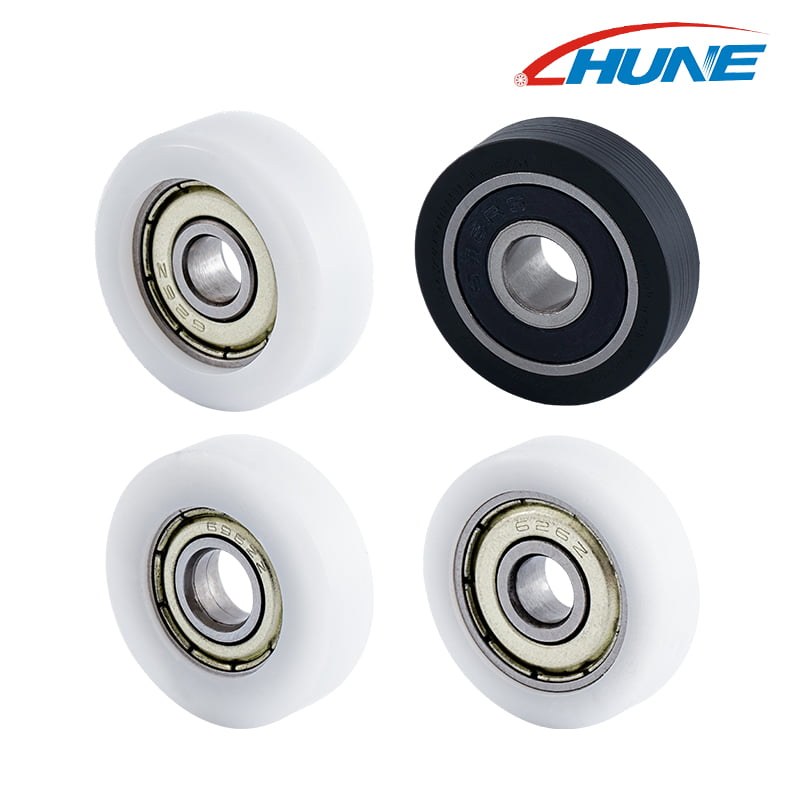
 This HUNE media-library image shows compact flat plastic-coated bearing rollers. A packaging-machine application still requires matching the tread, bearing, axle and mounting to the actual film-contact function.
An idler roller is normally driven by film contact rather than by a motor. It may redirect the film, increase wrap around another roller, support a sensor span, isolate a tension zone or guide an edge. Large full-width idlers and small bearing-supported guide wheels can exist in the same machine, but they are not interchangeable.
Important idler characteristics include:
- low rotating inertia for fast response;
- controlled bearing torque;
- sufficient tube and shaft stiffness;
- low radial runout;
- balance appropriate to speed;
- parallel installation relative to other rollers;
- surface finish compatible with the film; and
- enough face width for expected lateral movement.
Maxcess notes in its guide on how rollers affect web-handling performance that precise, stiff idlers help avoid tension fluctuation. The same source explains that air carried with a fast web can reduce contact and create slip. This becomes more important as film speed and roller diameter change.
For compact side guidance, transfer modules or low-load auxiliary mechanisms, HUNE’s flat plastic-coated bearing rollers provide one starting architecture: a polymer running surface around a steel bearing. They should not be presented as direct replacements for full-width packaging-machine idlers or primary nip rolls. The supplier must confirm whether the wheel contacts the film face, film edge, a belt, a rail or another machine component.
Our guide to what a bearing roller is explains why the wheel, bearing, axle, spacer and bracket should be evaluated as one assembly.
How Do Roller Alignment and Runout Affect Film Tracking?
A film web responds to the geometry of every roller it wraps; small angular errors can create lateral movement and uneven tension.
Roller axes should be established from machine datums rather than aligned by visual appearance. If one roller is skewed, the web can move laterally, form diagonal wrinkles or load one edge more than the other. A flexible frame can create the same problem only under operating tension.
Radial runout makes the effective roller radius change once per revolution. This can create cyclic velocity or tension variation, particularly when the roller is used for encoder feedback. Axial runout or wobble can disturb the web laterally. Bearing internal clearance, shaft fit, tube concentricity and end-cap assembly all contribute to the finished condition.
I usually separate four measurements:
- roller-body radial runout relative to its rotation axis;
- axial movement or face wobble;
- parallelism between adjacent roller axes; and
- deflection under the actual web load.
A roller can pass unloaded runout inspection yet bend enough in operation to create cross-web tension variation. Wide film, long roller spans and narrow shafts deserve stiffness analysis in addition to bearing selection.
Edge-guiding systems correct remaining lateral drift. A sensor reads one edge, both edges or the web centerline; an actuator then moves an unwind stand, guide frame or steering roller. The guide can correct normal disturbances, but it should not be used to hide gross mechanical misalignment.
What Causes Wrinkles, Air Entrainment and Film Slip?
Wrinkles and slip usually reflect a combination of tension distribution, roller geometry, traction and air behavior.
Common wrinkle mechanisms include:
- uneven tension across the film width;
- a skewed or deflected roller;
- film thickness variation;
- baggy edges or a nonuniform wound roll;
- incorrect forming-collar setup;
- excessive or insufficient tension;
- sudden changes in web direction;
- static attraction or blocking; and
- trapped air between film layers or between film and roller.
At higher speed, moving film drags a boundary layer of air. If air enters the nip between film and roller, the effective contact area and traction can decrease. Surface grooves, vacuum rolls, greater wrap angle or another roller arrangement may help, but each affects the film differently.
Spreader rollers deliberately create a cross-web action that opens wrinkles. Bowed, grooved, spiral or reverse-crown designs each rely on particular geometry and operating direction. The Maxcess overview of spreader rollers describes these as purpose-built components for wrinkle control. They are not universal idlers, and the wrong spreader can distort a sensitive web.
Film slip at a pull roll can come from low nip force, contamination, insufficient wrap, surface wear or acceleration demand. Slip at an idler may be acceptable if the roller is not measuring web position, but it can create scratches or heat. Define the function before choosing the correction.
How Does Registration Keep Printed Film in Position?
Registration control measures printed marks and adjusts film feed so graphics, seals and cuts remain synchronized.
Preprinted packaging film contains a repeat length. A contrast or color sensor detects a registration mark, and the controller compares its position with the machine cycle. A servo then trims film feed or corrects the sealing and cutting phase.
Registration accuracy depends on the mechanical web path as much as the sensor. Variation can come from:
- film stretch caused by tension;
- slip at pull belts or encoder rollers;
- roller runout;
- changing unwind conditions;
- inconsistent printed repeat length;
- sensor response to glossy, transparent or low-contrast material; and
- delay between the sensing point and the sealing station.
Omron’s color-mark sensor guide for packaging materials discusses the challenge of glossy metallized, colorful and low-reflection films. This supports a practical OEM rule: approve the sensor with the actual production film, print and background rather than with plain laboratory stock.
An encoder roller must also maintain reliable contact. If the film aeroplanes over the roller or slips during acceleration, the encoder can report roller rotation rather than true film travel. Increasing nip is one option, but it can damage the film; wrap angle, surface, vacuum and sensor placement should be reviewed together.
How Should Roller Surface and Material Be Selected?
Select each surface for its real contact job: release, traction, gentle support, wear resistance or static control.
Typical choices include polished or anodized aluminum idlers, stainless steel rollers, rubber or polyurethane traction surfaces and engineering-plastic guide wheels. No material is best for every packaging film.
Review:
- film resin and thickness;
- printed, coated, metallized or adhesive side;
- allowable marking and surface pressure;
- desired traction or release;
- roller diameter and wrap angle;
- operating temperature;
- cleaning chemicals;
- static-dissipation requirement;
- food, pharmaceutical or other compliance needs; and
- expected buildup and cleaning frequency.
A softer covering can improve grip and conform to small variations, but it can also deform, heat, swell or retain contamination. A hard smooth roller may release well yet provide insufficient traction. Grooves can vent air but may print a pattern into soft film when pressure is high.
For a compact polymer bearing wheel, POM, nylon and polyurethane provide different stiffness, moisture response, wear and traction behavior. The HUNE roller materials and processes overview helps OEM buyers frame this discussion, but the final grade and geometry require sample testing with the real film or mating component.
Which Dimensions Should the OEM Drawing Control?
The drawing should define the roller’s functional axis, running surface and relationship to the web path.
For full-width idlers, useful controls can include:
- finished outside diameter and face length;
- radial runout of the surface to the bearing axis;
- cylindricity or specified crown/profile;
- surface roughness and coating specification;
- shaft-end dimensions and bearing seats;
- balance requirement at the defined speed;
- axis datum and mounting parallelism; and
- allowable deflection under the specified load.
For a compact bearing guide wheel or auxiliary roller, confirm:
- bearing bore, outside diameter, width and protection type;
- finished wheel diameter and face width;
- flat, crowned, grooved or flanged outer profile;
- wheel runout relative to the bearing bore;
- axle diameter, shoulder and clamping stack;
- bracket location and stiffness;
- axial clearance to washers or side plates; and
- film-edge or machine-component contact geometry.
Do not clamp the rotating bearing ring with a washer or bracket. Do not assume that a standard bearing’s catalog speed or load rating establishes the finished roller’s capability. Overmolding, fit, seal drag, wheel material, axle alignment and temperature can change actual behavior.
HUNE’s guide for a plastic-coated bearing in a conveyor guide system provides related drawing and validation considerations for compact guide rollers used in equipment.
How Should an OEM Validate the Film-Transport System?
Test the complete path with the real film across roll diameter, speed and environmental extremes.
 A useful validation checks the mounted roller, axle, bracket, film force and sensor relationship rather than testing the bearing alone.
A practical validation plan should cover:
- startup from a full roll and a nearly empty roll;
- acceleration, steady speed, deceleration and emergency stop;
- dancer travel and tension response;
- film position through guides, forming tooling and seals;
- pull-belt or nip slip under normal and peak acceleration;
- registration error over a statistically useful run;
- wrinkles, scratches, static and surface marking;
- roller temperature, bearing noise and vibration;
- runout and wear before and after cycling;
- dust, humidity, temperature and cleaning exposure; and
- changeover to the thinnest, widest or lowest-friction approved film.
I would record both machine variables and package results. Tension, dancer position, servo following error, encoder counts and sensor timing can identify the mechanism behind a defect. Finished-bag length, seal location, print registration and appearance establish whether the system is acceptable.
The test should also identify what happens after a stop. Some films relax, stretch or stick to a roller during dwell. A machine that performs well at constant speed may show the largest error on the first few cycles after restarting.
What Information Should a Buyer Send a Roller Supplier?
A useful inquiry identifies where the roller sits in the film path and what it contacts.
Send:
- packaging-machine type and roller function;
- film type, thickness range, width and surface/coating information;
- whether contact is on the printed, sealant or product-facing side;
- web speed, acceleration and cycle pattern;
- normal and maximum film tension;
- driven, idling, sensing or edge-guiding role;
- required wrap angle and film travel direction;
- roller or wheel drawing with functional datums;
- axle, bearing, spacer and bracket arrangement;
- allowable runout, torque, noise and temperature;
- cleaning chemicals, humidity, dust and static conditions;
- applicable compliance requirements;
- annual volume and prototype quantity; and
- current failure evidence when replacing an existing component.
For a small guide roller, photos are useful but do not replace a section drawing. Include the mating belt, rail, film edge or bracket because that geometry determines the running profile.
HUNE manufactures custom plastic-coated bearing rollers, compact guide wheels, axles, spacers and stamped brackets for OEM equipment. We can review material, bearing protection, outer profile and mounting as one assembly, then develop samples through the HUNE OEM process. To discuss a packaging-machine roller position, send HUNE the drawing and operating conditions.
Frequently Asked Questions
Why does packaging film move sideways on the rollers?
Lateral movement can come from roller skew, frame deflection, uneven cross-web tension, a poorly wound supply roll or inconsistent film properties. An edge guide can correct normal drift, but the machine geometry should be checked first.
Do all packaging-machine rollers need bearings?
No. Full-width rollers may use bearings at their ends, while some compact guide positions use plain bushings or fixed low-friction surfaces. Driven shafts, dancer pivots and auxiliary wheels have different requirements. Select the support from load, speed, torque, environment and duty.
Is lower roller friction always better for film transport?
No. Low predictable bearing drag is useful for idlers, but drive rollers and pull belts require controlled traction against the film. The goal is low unwanted resistance and sufficient intentional grip at the correct locations.
Can a small plastic bearing roller contact packaging film directly?
It can in a suitable auxiliary guide or edge-support position if the profile, material, surface quality, load and compliance requirements are approved. A compact bearing wheel should not automatically replace a precision full-width idler, nip roller or food-contact component.
Practical Engineering Recommendation
Begin with the film and the required package accuracy, then assign a clear job to every roller, sensor and drive.
Divide the path into tension zones, identify where traction is required, control roller alignment and runout, and validate registration with the real production film. Use low-drag bearing rollers where they improve response in compact idler or guide positions, but specify the outer surface, axle, bracket and mating geometry with the bearing. Approve the complete transport system under realistic roll diameter, speed, acceleration and environment before releasing it for mass production.