

The main printer roller types are pickup rollers, separation or retard rollers, feed and transport rollers, registration rollers, pinch or pressure rollers, platen rollers, exit rollers and free-running guide or idler rollers. Duplex printers may add reversing rollers, while roll-media printers can include tension, dancer and belt-support rollers. Laser printers also contain process rollers for charging, developing, transferring and fusing an image.
These names describe functions, not universal part designs. One roller selects the top sheet, another establishes traction, another corrects skew, and another supports paper through the print zone. Their materials, drive connections, bearings and mating geometry therefore differ. For OEM sourcing, the first step is to identify the roller's position and job inside the complete paper path rather than ordering a generic “printer roller” by diameter alone.
Which Rollers Appear Along the Printer Paper Path?
Roller names normally follow the stage where each roller acts on the medium.
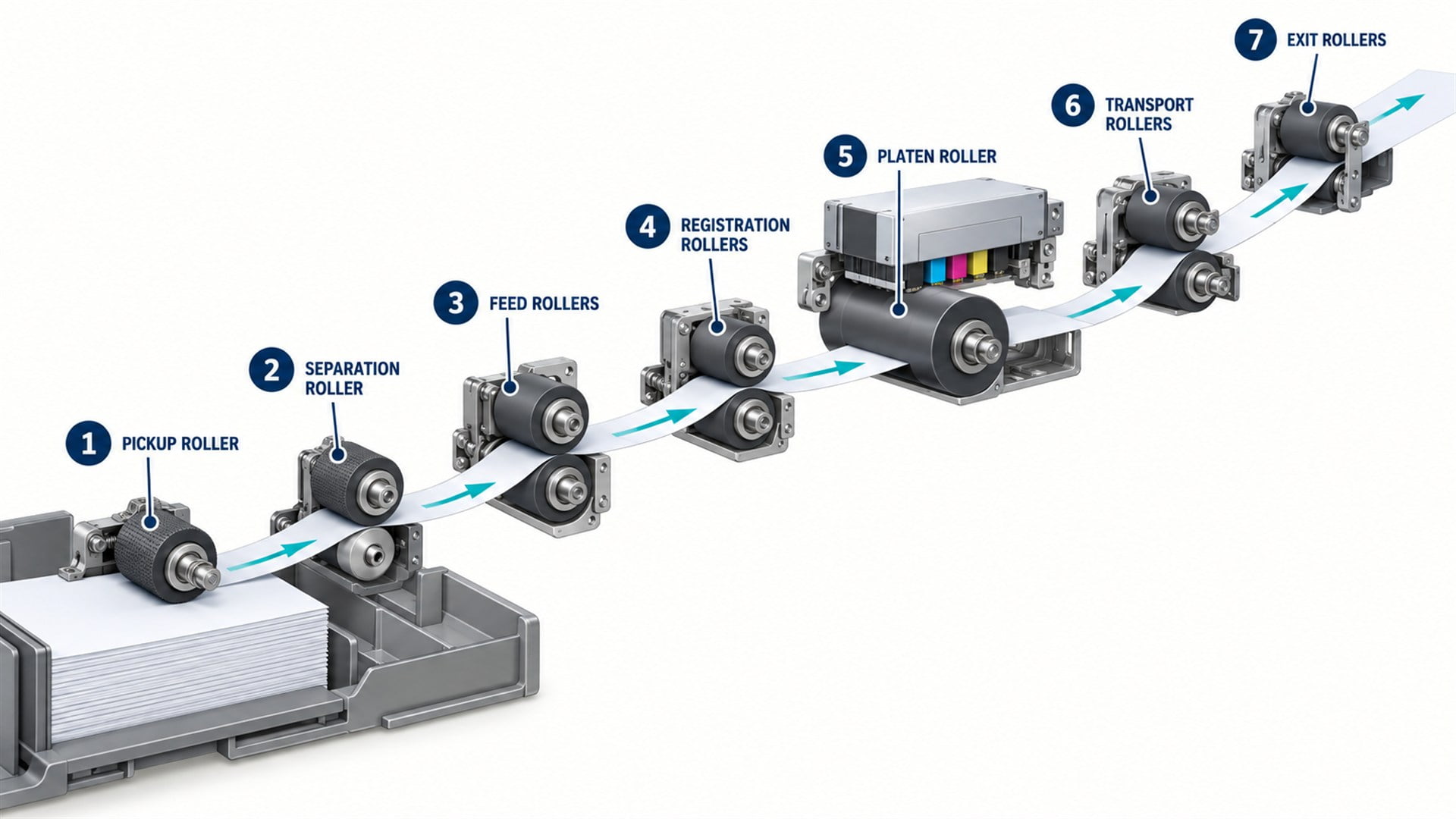 Conceptual cut-sheet printer path. Exact roller count and order vary between inkjet, laser, thermal and specialty printers.
| Roller type | Primary function | Typical mechanical requirement |
|---|---|---|
| Pickup roller | Start the top sheet moving from a stack | Initial traction, controlled engagement and media compatibility |
| Separation or retard roller | Resist additional sheets so one sheet proceeds | Deliberate friction and torque relationship with the feed roller |
| Feed roller | Pull the selected sheet into the main transport path | Stable traction, drive connection and effective-diameter control |
| Transport roller | Continue moving media between functional stations | Consistent speed, alignment and nip force |
| Registration roller | Correct leading-edge skew and release the sheet at the required time | Straight nip line, controlled start and positional repeatability |
| Pinch or pressure roller | Press media against a drive or platen roller | Compliance, low marking and controlled normal force |
| Platen roller | Support and often drive media at the printhead | Diameter accuracy, surface quality and print-gap compatibility |
| Exit or delivery roller | Move the printed sheet into the output area | Reliable grip without damaging fresh print or toner |
| Guide or idler roller | Support, redirect or stabilize paper or a moving belt | Low drag, quiet rotation and suitable running profile |
| Reversing or duplex roller | Change transport direction for second-side printing | Bidirectional grip, timing and controlled switching |
| Belt drive, support or tension roller | Drive, support and track a transport belt | Belt compatibility, alignment, bearing quality and tension control |
Not every printer uses every type. A compact thermal printer may rely on one platen roller to pull label or receipt media past the printhead. A sheet-fed laser printer can contain several pickup, registration, transport and delivery nips. A production inkjet machine may use a vacuum belt with drive and idler rollers rather than a line of paper-contacting feed rollers.
The complete printer paper-feed system is the useful design context because the same sheet can be controlled by several roller pairs during one cycle.
What Does a Pickup Roller Do?
The pickup roller initiates feeding by moving the top sheet away from the stack.
A pickup roller contacts the upper sheet in a tray or feeder. It may move down onto the stack, rotate for part of a cycle or engage through a clutch. Its surface needs enough traction to start the sheet under the intended stack pressure and media condition.
The pickup roller does not normally complete sheet separation by itself. As it moves the top sheet toward the paper path, a separation pad, retard roller or other separation device discourages lower sheets from following.
Pickup performance depends on more than roller material. Contact location, stack lift force, roller width, surface texture, effective diameter and drive timing affect how the leading edge enters the next stage. A roller that grips strongly can still produce skew if it contacts the sheet asymmetrically or if the tray guides do not establish a consistent starting datum.
A printer patent describing a sheet feeding and conveying apparatus identifies the pickup roller, feed roller, separation roller and registration roller as distinct elements that act in sequence. It also shows why their engagement timing matters to overall transport load.
What Is the Difference Between Separation and Retard Rollers?
Both help prevent double feeding, but the mechanism may apply resistance in different ways.
A separation roller operates against a feed roller near the tray exit. In some designs, it is driven or torque-limited in a direction that resists extra sheets. A retard roller may use a torque limiter, clutch or controlled reverse tendency so that the top sheet moves forward while lower sheets are held back.
The word “separation roller” is also used broadly for passive or driven separating members. The assembly drawing should show the intended rotation, torque path and contact pair. Two visually similar rubber rollers may not be interchangeable if one is free-running and the other contains a torque-limiting mechanism.
The friction hierarchy is critical. The pickup or feed surface must move the intended sheet, while the separation element resists additional sheets. Paper-to-paper friction, surface coating, dust and humidity affect the outcome. A supplier cannot select the correct roller from diameter and hardness alone.
What Do Feed and Transport Rollers Do?
Feed and transport rollers create the main forward movement through the printer.
The terms overlap. “Feed roller” may describe the driven member immediately after pickup, or it may be used generically for any roller that moves media. “Transport roller” usually refers to rollers positioned farther along the path.
A driven roller receives torque through a shaft, gear or belt. An opposing pinch or idler roller supplies normal force so friction can act on the sheet. Diameter, runout, shaft alignment and nip-force distribution influence whether the paper moves at the expected speed without skew.
In long or curved paths, multiple transport nips may hand the sheet from one stage to the next. Their surface speeds must be compatible. If a downstream nip pulls faster while an upstream nip remains engaged, the sheet can become tensioned. If the upstream stage pushes faster, the sheet can buckle. Clutches, one-way mechanisms, compliant loops or coordinated motor control may manage this transition.
Patent documentation for an image-forming apparatus describes pickup, registration, transport and delivery functions along a printer transport path. It is useful evidence that “transport roller” is one member of a sequence rather than a complete feeding solution.
What Is a Registration Roller?
A registration roller establishes sheet timing and often corrects leading-edge skew before imaging.
In many printers, the leading edge reaches a stationary registration nip. Continued upstream feeding creates a controlled buckle that helps the edge settle along the straight nip line. The registration rollers then start at the commanded time and deliver the sheet toward the imaging zone.
Other systems use lateral registration, active steering or movable rollers. The goal remains the same: establish a repeatable sheet position relative to the image process.
Registration performance depends on nip straightness, shaft parallelism, roller runout, surface condition, sheet stiffness, sensor position and control timing. Replacing the roller cannot correct a bent bracket or an inaccurate sensor datum.
Our guide to how printers keep paper aligned explains the relationship between tray guides, feed rollers, registration mechanisms and sensors.
What Is a Platen Roller?
A platen roller supports media at the print zone and often controls its movement past the printhead.
In direct thermal and thermal-transfer printers, the platen roller presses the label, receipt paper or ribbon stack against the printhead while rotating to advance the medium. Diameter, hardness, runout and surface condition can affect print density, feed distance and image consistency.
Some inkjet equipment uses a fixed platen surface rather than a platen roller. In other architectures, rollers positioned near the platen feed the sheet while the platen establishes the print gap. The term should therefore be confirmed from the machine drawing.
Platen rollers frequently use an elastomer surface over a rigid shaft or core. The outer layer provides compliant contact, while the shaft transmits torque and establishes the rotational datum. Bearing locations may be in the frame rather than inside the roller body.
Official Epson documentation for a label printer identifies separate paper-feed, platen and paper-pressure roller areas, illustrating that even a roll-media printer uses different rollers for different positions.
What Do Pinch, Pressure and Idler Rollers Do?
These rollers normally follow the driven surface and create or stabilize contact.
A pinch roller presses media against a driven roller, capstan or platen. A pressure roller is a broader term that may describe the same function or a specialized roller in a printing or fusing nip. An idler roller rotates without its own commanded drive and may oppose a drive roller, guide media or support a belt.
These names are not exact synonyms. A pinch roller is usually an idler with a pressing function. An idler can also sit alone along a curved path and never form a powered nip. A pressure roller inside a laser-printer fuser has heat and image-process requirements beyond those of an ordinary paper-transport idler.
For sourcing, identify whether the roller rotates around a fixed pin, turns with a shaft or contains an integrated bearing. Our article on what bearings do in printer rollers explains how these arrangements change the load path and mating dimensions.
How Are Drive, Pinch and Idler Rollers Different?
The difference is how motion and normal force enter the roller pair.
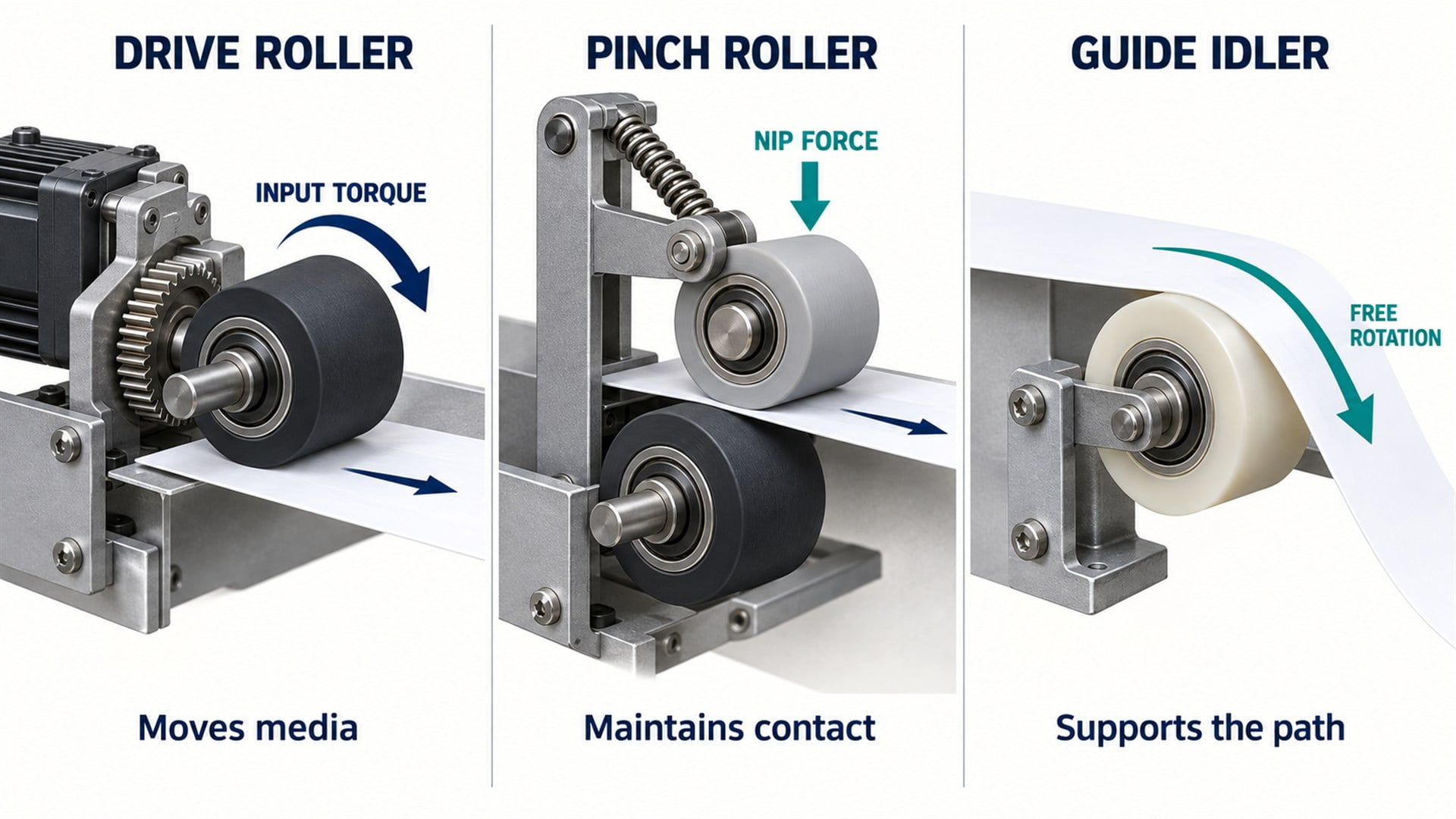 Simplified functional comparison. One physical roller can receive a different name depending on its role in the assembly.
| Roller role | Source of rotation | Contact function | Key sourcing detail |
|---|---|---|---|
| Drive roller | Motor, gear, belt or powered shaft | Supplies tangential force | Torque-transfer interface and effective diameter |
| Pinch roller | Follows the drive or moving medium | Supplies normal force at a nip | Spring geometry, compliance and shaft freedom |
| Guide idler | Follows paper or belt contact | Redirects or supports the path | Bearing drag, profile and mounting alignment |
A powered roller needs a positive torque path such as a fixed shaft, molded insert, flat, key, spline or gear. A free idler needs low and consistent rotational resistance. Confusing the two can produce either a roller that slips on its shaft or an idler that binds.
For compact guide and idler positions, a sliding roller with an integrated bearing can combine the outer running surface and rotational support. Its suitability depends on speed, load, shaft fit, environment and what the wheel contacts.
What Do Exit and Delivery Rollers Do?
Exit rollers complete transport while protecting a freshly printed surface.
After imaging, the sheet must leave the print zone, pass any drying or fusing stage and reach the output tray. Delivery rollers provide this final movement. Their surface and pressure must suit the media condition at that point.
In laser printers, paper may be warm after the fuser. In inkjet systems, ink may not be fully dry. Some designs minimize contact area with star wheels or narrow rollers to reduce marking. Others use conventional roller pairs where the image and media permit.
The HP LaserJet service manual's paper-path diagram identifies pickup, fuser-pressure and face-down delivery rollers as separate elements. This also shows why a roller name must be interpreted within the printer technology.
Exit rollers may reverse direction in duplex or face-up/face-down routing systems. Gear backlash, one-way clutches, surface grip and control timing become relevant when the same nip must stop and reverse a sheet.
Which Rollers Are Used in Roll-Media and Belt Systems?
Continuous media introduces tension, wrap and tracking functions beyond cut-sheet transport.
Large-format, label and industrial printers may include:
- a supply-roll support or unwinding shaft;
- dancer or tension rollers that respond to web tension;
- guide rollers that define the route and wrap angle;
- driven capstan or platen rollers that establish media speed;
- pinch rollers that hold the web against the driven surface;
- belt drive rollers, idlers and tensioners;
- take-up rollers that collect printed media.
Roll diameter changes as media unwinds or accumulates, so supply and take-up torque cannot always be controlled by rotational speed alone. The main transport roller or encoder normally establishes the critical media speed, while other drives manage tension.
Guide rollers in these systems may use rigid plastic, coated metal or plastic-coated bearings. HUNE's flat roller wheels show a compact bearing-centered wheel format relevant to some guide and support positions after the complete mounting and contact requirements are reviewed.
Which Rollers Are Unique to Laser Printers?
Laser printers contain image-process rollers that are different from ordinary transport rollers.
Depending on the electrophotographic design, these may include:
- charging rollers that establish an electrical condition on the photoconductor;
- developer rollers that deliver toner to the latent image;
- transfer rollers that help move toner from the image carrier to paper;
- fuser and pressure rollers that apply heat and pressure to fix toner;
- cleaning or toner-supply rollers with specialized surface and electrical properties.
These rollers may require controlled conductivity, surface energy, temperature resistance, release behavior or cellular structure. Their material and manufacturing requirements are not interchangeable with those of a general guide wheel.
HUNE's plastic-coated bearing rollers are most directly connected to mechanical guiding, supporting and low-drag transport functions. A buyer should not assume that a catalog bearing wheel can replace a charging, developer, transfer or fuser roller.
Which Dimensions and Interfaces Matter for Each Type?
Functional dimensions follow the roller's job and mating parts.
Across printer roller types, engineers commonly need to define:
- finished outside diameter and its relationship to feed distance or speed;
- radial runout relative to the shaft or bearing datum;
- roller width, segment spacing and contact position across the medium;
- tread profile, crown, grooves, texture and edge radii;
- coating or molded-wall thickness;
- shaft diameter, bearing seats, bores and running fits;
- gear, flat, spline, key or insert geometry for driven rollers;
- installed center distance to the opposing roller;
- spring location, available travel and nip-force method;
- axial spacers, shoulders, washers and retention;
- position relative to guides, sensors, printheads and belt edges.
There is no universal tolerance for every printer roller. A platen roller controlling print position may require different geometric controls from a free-turning guide wheel. The approved system design and tolerance analysis should set the acceptance limits.
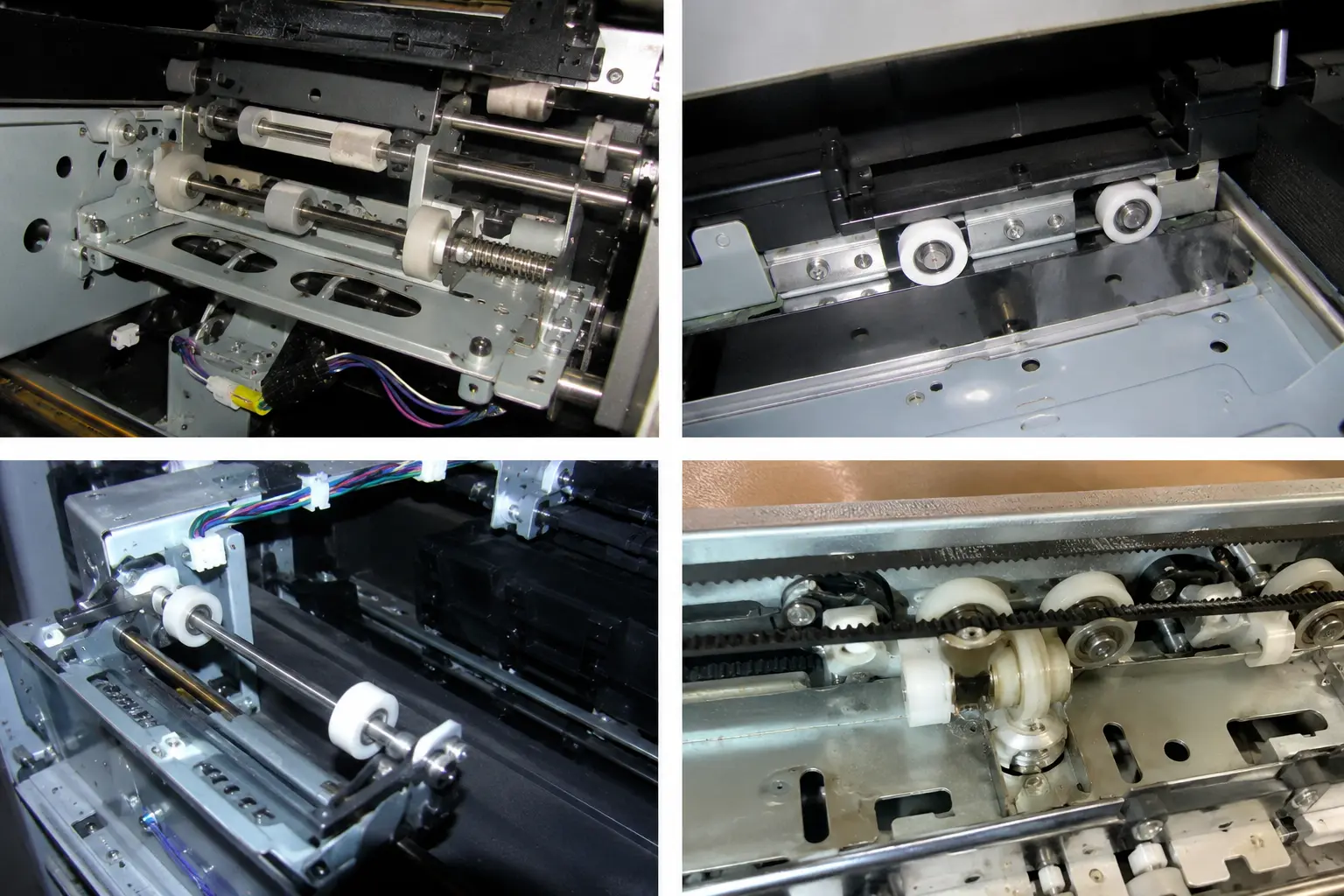 HUNE plastic-coated bearing roller concepts. Final material, bearing and geometry depend on the printer position.
What Should an OEM Buyer Send to a Roller Supplier?
A useful inquiry identifies the roller type and its complete operating interface.
Send the supplier:
- A paper-path drawing with the roller's position and media direction.
- The functional name: pickup, separation, drive, registration, pinch, platen, guide, exit or belt-support roller.
- Whether the roller is powered, free-running, spring-loaded, torque-limited or reversible.
- Finished dimensions, datums, fits, runout requirements and axial retention.
- Mating roller, belt, track, paper or label geometry and material.
- Media width, thickness, coating, stiffness and sensitivity to marking.
- Speed, duty, direction changes and operating environment.
- Known torque, nip condition, spring arrangement or belt tension from the system design.
- Material, hardness, color, electrical and regulatory requirements that are actually necessary.
- Prototype quantity, validation plan and expected production volume.
A photograph can help identify the general form, but it does not show the internal bearing, torque path or installed preload. If a complete drawing is unavailable, provide the sample together with the shaft, spacers and mating part.
FAQs
Are pickup rollers and feed rollers the same?
Sometimes the terms are used loosely, but their functions can differ. A pickup roller starts the top sheet moving from the stack. A feed roller pulls the selected sheet into or through the transport path, often while working with a separation member.
Is a platen roller always made of rubber?
No. Elastomer-covered platen rollers are common, especially in thermal printers, but material and construction depend on the print process. Some inkjet printers use a stationary platen with separate feed rollers rather than one driven platen roller.
Does every printer roller contain a ball bearing?
No. Some rollers rotate directly on a pin or bushing, while others are fixed to driven shafts whose bearings sit in the frame. Integrated ball-bearing rollers are most relevant where compact, low-drag rotation is required.
Which printer rollers can HUNE manufacture?
HUNE's product range is most relevant to plastic-coated bearing rollers, guide wheels, idlers and related mechanical transport components. Feasibility depends on the outer material, bearing, shaft, load, speed, contact function and required validation.
Discuss Your Printer Roller Application with HUNE
Identify the roller's job before choosing the wheel, bearing or material.
HUNE develops custom sliding rollers, plastic-coated bearing rollers and precision hardware for OEM equipment. For printer projects, we can review the outer wheel, bearing, shaft, mounting stack and mating geometry together and determine whether an existing format or custom molded roller is appropriate.
Send your drawing, sample, paper-path sketch, roller function, mating components, media range, environment and quantity through the HUNE contact page. Our practical recommendation is to define the torque path and contact condition first, then finalize the roller material and bearing arrangement.